Unable to Move UI Knob Directly — Only via Macro 1
-
Hi everyone,
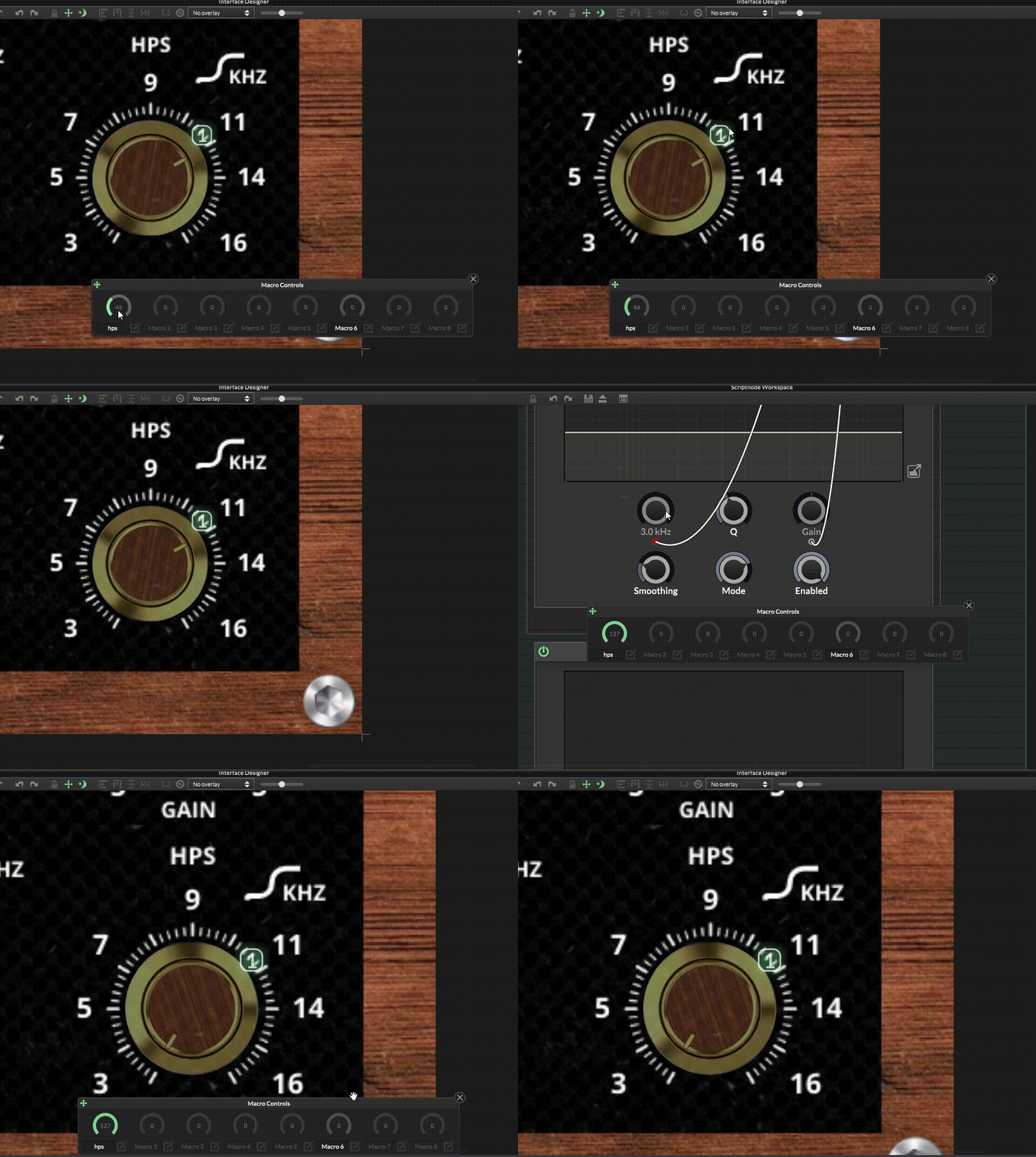
I created a knob in the UI and linked it to script FX1, specifically to a hseq knob inside the script that is connected to an SVF EQ node. Then I linked Macro 1 to the knob in the interface, and it works well — it jumps between frequencies in 6 steps, similar to a Stepped Frequency Knob.
However, the knob in the UI interface appears faded compared to the other normal knobs, and I can’t move it directly — it only moves through Macro 1, like in the video.
 ️
️
Also, I don’t want to write code because I don’t understand C++ or Java.
My question:
Why can’t I move the knob in the interface directly?Thanks in advance for any help!

-
@the-red_1 said in Unable to Move UI Knob Directly — Only via Macro 1:
Also, I don’t want to write code because I don’t understand C++ or Java.
You're in luck, HISE uses HISE Script and it's much easier to learn than C++ or Java :)
@the-red_1 said in Unable to Move UI Knob Directly — Only via Macro 1:
Why can’t I move the knob in the interface directly?
Don't connect the knob via the macro edit button like that. Use the macro assignment in the property editor instead.

Here's an example
HiseSnippet 1065.3ocuV0sTaaDEdW.QBj1LMcx0c7kjNYzXgC1vzKfZabvALwXaRH4Fl06tBs0R6pQZEfIS6UsuN8Yf2gdYupuA8Mn8rRBa4.kPXZquviN+smu87ymT2HEkGGqhP3kGLNjivegU+wRsWCOhPhZ2DgerUGRrlGUJSU8wgj3XNCgwy+RiB7RKfR+8maVm3SjT9TUHzaTBJeOQfPOUa2s1U362hv3CDAE79Ea0lpjMT9pD.OyaUFERniHmv2mXbaNKzNjXOD9asVmNjUcCFo1vpUGVygx1vsryFDNeXk0VuBeMZUpiaURYDdwsYBsJpuln4wvgVWwF22SclLKAuQDKF5yMBNn9PlyTiZ3I7Ycup3DiP3E5NsTMeVo5oVcDLwD8SKYeUpgRSinXQCO2sAImOCHgK.oExfzSr5SiDg5oVL34QVskPGzk.8lhPIyWD9RqFJvAo1NfLh2JBDlDvJUKW94kf+d124lHoZgRVRI2Wo4uVtxyV9CKuzx+3xk9XStt2nMSZhT997nazrYbH51BbEYRvPdzyKcJwOgOwQ35OaMcw6VMklcqK3nR1VJzuNjmK2R4yL0JyyWuCfxKaldQNBAW0ochGm2I56KX7Hj.NjGXsqTMzAkB9Ii8Wd7VnCa2jnIWcLvIBYIjGoElKCtI+TXIJqAujUSd7HsJL02fPkzje7i9jI8bD1B+SP9FadnC7PrdrojrXpCn.Ai4y6phElRdwkUWgePrFN11AvtHB+0VGFyKw3tjDeco3QvPuuPNhyFnRWRCHzH0jxwR.8AHWxAzedwKMvoD1WbAbfVVN1v.90mlg8HEKwmnmc4xP6jav.0hSzlwVIbEFWjV5yXiq7stwcWg3Sr5JzTuaFiycCXD57+WfwbdpuzZaWWNUOEfKX05nakTZg6V5u80iYHndPFVdnUCOUTRbJLVJWvYFrzCfPw12aELsWthK+le422rEmyFBuYHW2VUp7aa1j6SlsoO++RzrndpDsPdRGBrCX1h1OInO7FJJGpmRI2O1rPMmgMHStrQ1.h9bIKU3ufe4FcLx3biNWY7+kbjtWdLMawzzddXpF3dKSe+5zM0qQPAjChiozqNJLldEQN63PRDDN71B3aGLDNSapErjA1IJNNKiKZk1qCJ9UDnY3IfFou5rhV8Dm3Uzb7H9YyHCzJF4O7ze8k+wE+7lB4o.QZ1jUDmvTR+wlsP3FjZ..mxp1F1xAU2c8F85UdGa6d81o4asO5zN0p06fcIrQ1GvIiOevQM5pe+90eU68FUe00+gnUEUHt0rCe0gUN7rCrSnpNu+cJRkiNsgqeunQ1MSV8hViZUqxp0HU8pr2grl11HzMW2W8ip6lRwr08+g.qbeC7E22.W69FX06af0tuAt9mNPyGq88IZUPFWMB0o61ouOFi2VR.RhzgGzeiREjPcFree HISE Bootcamp Full Course for beginners.
YouTube Channel - HISE tutorials
My Patreon - More HISE tutorials -
@David-Healey
Thanks for the suggestion, but when I assign Macro 1 in the property editor, the UI knob still doesn’t move.
Also, the Macro itself only goes from 0 to 6 instead of 0–127 because in the property editor I set Max = 6, Min = 0, and 7 steps (FPS), so the macro and knob ranges don’t match the full 0–127 range expected for a macro control in HISEAlso, I have another knob in the UI that is set to 128 FPS, but I set Step Size = 1, Max = 6 and Min = 0 for it. It does rotate, but the steps and angles aren’t accurate — the increments feel uneven and the knob doesn’t feel precise when turning, likely because the UI control range doesn’t line up with the macro’s expected 0–127 range.
Lastly, I don’t want to use HISE Script for this because the DSP part doesn’t work for me or seems broken — it still fails even after building the latest HISE Dev version. I’m avoiding scripting because I can’t get the DSP network working reliably,
-
@the-red_1 Macros have a range of 0 - 127 so your knobs must use that range. Did you check the snippet i posted?
Free HISE Bootcamp Full Course for beginners.
YouTube Channel - HISE tutorials
My Patreon - More HISE tutorials -
@David-Healey It worked! Thank you from the bottom of my heart for all your efforts, and thanks once again.

-
@the-red_1 Excellent :)