Forum
    • Categories
    • Register
    • Login

    callWithPOST change content type

    Scheduled Pinned Locked Moved General Questions
    29 Posts 3 Posters 1.7k Views
    Loading More Posts
    • Oldest to Newest
    • Newest to Oldest
    • Most Votes
    Reply
    • Reply as topic
    Log in to reply
    This topic has been deleted. Only users with topic management privileges can see it.
    • D
      Daanyoo @Christoph Hart
      last edited by

      @Christoph-Hart I found the mistake - I had accidently reset the Server.HttpHeader() of the request when passing it into the makeHttpRequest function. Therefore only the the Auth Bearer Token was passed and the Content-Type was automatically set by HISE. Now I correctly appended the Bearer Token within the request and everything works perfectly fine :)

      Thank you guys so much for your help, I really appreciate it!!

      Christoph HartC 1 Reply Last reply Reply Quote 0
      • Christoph HartC
        Christoph Hart @Daanyoo
        last edited by

        @Daanyoo Alright, good to see it resolved.

        Ah but if I don't convert to string it seems to lose the authentication header, strange..

        I just looked at the code and it makes sense:

        if(isComplexObject)
        {
        	extraHeader = "Content-Type: application/json";
        	url = url.withPOSTData(JSON::toString(parameters, true));
        }
        

        this is the branch if you pass in a JSON with an Array and as you can see it replaces the extraHeader content with the JSON type definition. However this trashes whatever you've set before so your Authentication token goes out the window.

        There are multiple ways to solve this, but I'm not sure which route to take:

        1. append (or prepend) the Content Type definition to the existing header (unless there is already a Content type set, then ignore it)
        2. just don't fiddle with the content type at all here and let the user figure that out.

        Both are potentially breaking changes (while the first one is less intrusive) so let's proceed with caution here.

        David HealeyD 1 Reply Last reply Reply Quote 0
        • David HealeyD
          David Healey @Christoph Hart
          last edited by

          @Christoph-Hart I think the first one is the safest option

          Free HISE Bootcamp Full Course for beginners.
          YouTube Channel - Public HISE tutorials
          My Patreon - HISE tutorials

          D 1 Reply Last reply Reply Quote 0
          • D
            Daanyoo @David Healey
            last edited by

            @David-Healey @Christoph-Hart As I've just started building out the Installer of the plugin on a Windows VM I'm strangely running into a error again....

            As discussed the Server.callWithPOST function worked perfectly fine passing the JSON via trace() as stringified data - however, when trying to execute the same function on Windows the parsed string into the request is rejected due to the type check:

             local jsonData = trace(data);
                        
                        Server.callWithPOST(endpoint, jsonData, function(status, response)
            

            Error: Illegal type: string, expected: JSON

            Is there any other type check embedded here which will only trigger while on Windows?
            Not sure how I could create a workaround for that..

            David HealeyD 1 Reply Last reply Reply Quote 0
            • David HealeyD
              David Healey @Daanyoo
              last edited by

              @Daanyoo Are you using the same version of HISE on both systems? I'm not aware of any Windows specific limitation.

              Free HISE Bootcamp Full Course for beginners.
              YouTube Channel - Public HISE tutorials
              My Patreon - HISE tutorials

              D 1 Reply Last reply Reply Quote 0
              • D
                Daanyoo @David Healey
                last edited by

                @David-Healey Yes, both are running on the latest version of HISE - I also didn't expect any OS specific differences here..

                D 1 Reply Last reply Reply Quote 0
                • D
                  Daanyoo @Daanyoo
                  last edited by

                  No Matter how I try passing the JSON object into the callwithPOST function, it always arrives in this URL-encoded format, which makes my request for the license activation fail.

                  One for Christoph I guess...

                  Christoph HartC 1 Reply Last reply Reply Quote 0
                  • Christoph HartC
                    Christoph Hart @Daanyoo
                    last edited by

                    @Daanyoo have you tried trace(ob) before passing it in? There is some funkiness going on with Post parameter handling. You might also have to call a header that sets the json content type.

                    D 1 Reply Last reply Reply Quote 0
                    • D
                      Daanyoo @Christoph Hart
                      last edited by Daanyoo

                      @Christoph-Hart I use trace(data) and it works perfectly fine on OSX.

                      local jsonData = trace(data);
                                  
                                  Server.callWithPOST(endpoint, jsonData, function(status, response) {
                                      if (status == 200) {
                                          currentHttpCallback(true, response);
                                      } else {
                                          currentHttpCallback(false, {"error": "HTTP " + status});
                                      }
                      

                      However when executing the same function on my Windows HISE build the typecheck fails and String is rejected:

                      Interface:! LicenseManager.js (767): Illegal type: string, expected: JSON

                      The json content type is also being correctly passed, as the request is successful on OSX.

                      David HealeyD 1 Reply Last reply Reply Quote 0
                      • David HealeyD
                        David Healey @Daanyoo
                        last edited by

                        @Daanyoo set the content type header

                        Free HISE Bootcamp Full Course for beginners.
                        YouTube Channel - Public HISE tutorials
                        My Patreon - HISE tutorials

                        D 1 Reply Last reply Reply Quote 0
                        • D
                          Daanyoo @David Healey
                          last edited by

                          @David-Healey I already did:

                          Server.setBaseURL(MOONBASE_API);   
                                  Server.setHttpHeader("Content-Type: application/json\nAuthorization: Bearer " + currentAccessToken); 
                          
                          D 1 Reply Last reply Reply Quote 0
                          • D
                            Daanyoo @Daanyoo
                            last edited by Daanyoo

                            As already mentioned, the request using the same function with the JSON string is delivered perfectly fine on OSX:
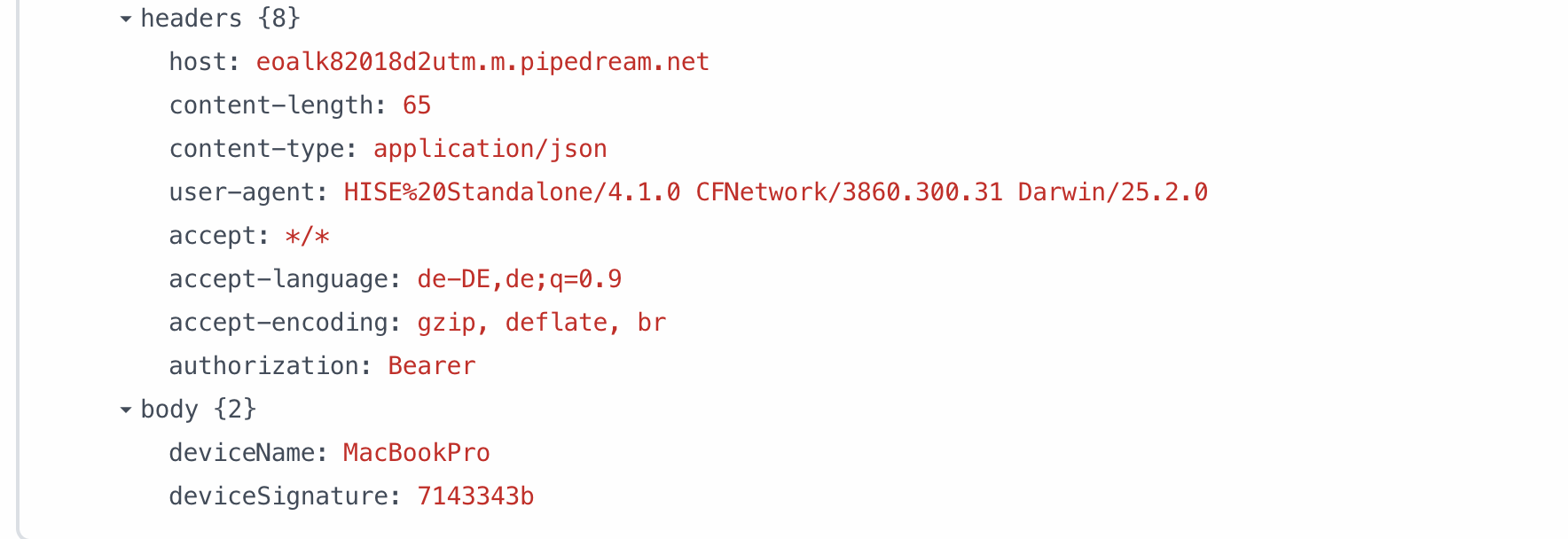
                            2019e1bc-04d3-4a60-82a2-b1b13744982b-image.png

                            I cant figure out why it wouldn't work on WIN, even though the code is identical.

                            D 1 Reply Last reply Reply Quote 0
                            • D
                              Daanyoo @Daanyoo
                              last edited by

                              @Daanyoo I just tried to reproduce it on a empty project on WIN, it worked there and all of the sudden it worked in the regular project as well... I am so confused haha

                              But at least its fixed, thank you guys for your help!!

                              1 Reply Last reply Reply Quote 0
                              • First post
                                Last post

                              20

                              Online

                              2.2k

                              Users

                              13.4k

                              Topics

                              116.4k

                              Posts
