WhiteBox Packages Nightmare on Sonoma
-
@clevername27 is that a new addition? I bought it when it was first released but found I couldn't do some of the things I was doing in Whitebox and haven't tried it again since
-
@DanH Yes, it is a brand new addition.
-
@clevername27 ah cool, I'll give it another go
-
@clevername27 said in WhiteBox Packages Nightmare on Sonoma:
has built-in support for installing audio plugins.,
Can you elaborate?
-
@clevername27 said in WhiteBox Packages Nightmare on Sonoma:
@David-Healey It works (no bugs), and thanks to your truly, it has built-in support for installing audio plugins.,
Ok well I'm assuming we are talking about Package Builder here... its not clear above but heres the URL: https://www.araelium.com/packagebuilder
So my "...support for installing audio plugins" question is:
Can I point the destination at the system folder for plugins? i.e
~/Library/Audio/Plugins
and not the ~/users//Library version of this path?
..and get it to ask the user for the relevant password when they run it. In other words avoiding all those silly Mac permissions problems...
HISE Development for hire.
www.channelrobot.com -
@Lindon said in WhiteBox Packages Nightmare on Sonoma:
~/Library/Audio/Plugins
That's the default with WhiteBox.
Free HISE Bootcamp Full Course for beginners.
YouTube Channel - HISE tutorials
My Patreon - More HISE tutorials -
@David-Healey said in WhiteBox Packages Nightmare on Sonoma:
@Lindon said in WhiteBox Packages Nightmare on Sonoma:
~/Library/Audio/Plugins
That's the default with WhiteBox.
Thats not my experience.....but I will admit its been a while since I used it.
In fact wasnt there a whole video demo (maybe one of your Dave?) explaining the required additional scripting to move the plugin to the system folders?
HISE Development for hire.
www.channelrobot.com -
@Lindon When you create a new package this checkbox will be enabled by default

And it will install to the system folders. If you want to install to the user folders you need to go the Packages menu >> Settings >> Advanced and enable Show Advanced User Options.
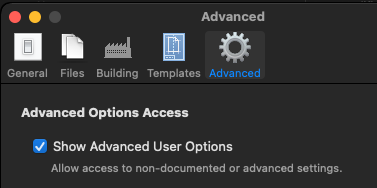
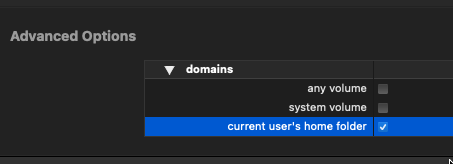
Then in the project settings you'll have access to the Advanced Options section and you can enable the "current user's home folder" checkbox
@Lindon said in WhiteBox Packages Nightmare on Sonoma:
In fact wasnt there a whole video demo (maybe one of your Dave?) explaining the required additional scripting to move the plugin to the system folders?
That's if you want to install into both the system and users folders from a single installer. A single package can only install into one of these.
Free HISE Bootcamp Full Course for beginners.
YouTube Channel - HISE tutorials
My Patreon - More HISE tutorials -
@David-Healey said in WhiteBox Packages Nightmare on Sonoma:
That's if you want to install into both the system and users folders from a single installer. A single package can only install into one of these.
Oh right I misunderstood then - but as I havent used whitebox for a couple of years(I built my own installer) it seems quite viable.....thanks.
-
@Lindon The audio plugins folder is now a default option in the menus—you don't have to point it.
-
@David-Healey Dave is…correct (as usual) about the old version of new Packages. I don't remember if the new version does or not. There is, however, a built-in scripting now built into the new Packages.
-
@Lindon Your installer is dope, and very cool.
-
@clevername27 said in WhiteBox Packages Nightmare on Sonoma:
old version of new Packages
I'm using the latest version
-
@clevername27 said in WhiteBox Packages Nightmare on Sonoma:
@Lindon Your installer is dope, and very cool.
why thanks. I built it because Sample based instruments of any sophistication will need a whole bunch of different data to be stored in different places:
- The plugin in its correct folder (white box and package builder are good at this bit)
- The "app data folder" - for stuff like meta data
- The presets folder - which is in the AppData folder
- the Expansions folder - ditto above
- the sample data folder - and its friend the LinkFile which needs completing...
In a "just open one thing once and get it all done" approach the "commercial" installers are not really set up to do this stuff without learning a whole bunch of scripting(and really why should they be...) so building my own was the only option.


