Transparent Background for AudioWaveForm Workaround
-
I read in this post that the background of Audiowaveform can't be transparent: https://forum.hise.audio/topic/5500/audiowaveform-set-background-transparent-bug/2?_=1709659610912
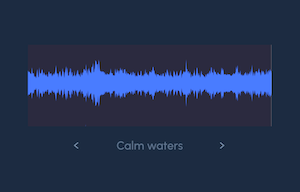
But still, I realized that if you use a slightly darker color (than the GUI background) for the waveform background, you achieve that transparent effect.
In Hise it looks good, and the exported plugin in Ableton also looks good. But in all the other DAWs I tried it looks different.
Inside HISE and Ableton:
Other DAWs:
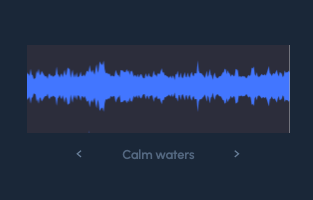
Does anyone have a workaround to make the audiowaveform background transparent in all DAWs?
-
@bendurso Both those images look the same to me
Free HISE Bootcamp Full Course for beginners.
YouTube Channel - HISE tutorials
My Patreon - More HISE tutorials -
@d-healey said in Transparent Background for AudioWaveForm Workaround:
e images look the same to me
In the second image you can see the background of the waveform (different from the background of the GUI). In the first it is almost completely transparent.
-
@bendurso I can see the waveform background in both. Take a look on a different monitor.
Free HISE Bootcamp Full Course for beginners.
YouTube Channel - HISE tutorials
My Patreon - More HISE tutorials -
@d-healey Oh yes, on another monitor I could see better that the background can be seen on both. The second however is darker.
Beyond this, is there any trick to make it fully transparent?
-
@bendurso said in Transparent Background for AudioWaveForm Workaround:
But still, I realized that if you use a slightly darker color (than the GUI background) for the waveform background,
Why not make it the same colour?
-
Actually if you turn off the opaque setting then you can get a transparent background.

Free HISE Bootcamp Full Course for beginners.
YouTube Channel - HISE tutorials
My Patreon - More HISE tutorials -
@d-healey My opaque setting is turned off. But still I can't achieve that result. How did you make it?
-
@bendurso Do you have the enableRange overlay turned on?
HiseSnippet 1082.3ocyW0saaTDEdlXuQ3.TQoEItbufKRkpZsIsEj5E3jXavB6DKugB2YMY2wdGkYmYY1YchUoua7Hv6.u.bAWwMvY1e7tasI0wjTgkRjmybNy7c966LdjR5RihjJDtwYKBoH7GY4rPn8O1mvDn9cP36YMjDooJ6TQGsHjDEQ8PXbsu0H.2nNJ4ye7MGQ3DgKsPDB8JIykNfEvzERG096YbdOhG8LVPIseV69tRwwRtLFvSMqlnPh6EjYzSHF01wBg2sqGSKUNZhlFA5bjzagiu7RQp9uhEwNmSMKZgbfCJUL5XeF2aTtuFgPXqQEddsTO+gVCYdrkxKh.eRxF1EVTNFf245fTqa.jvkfT8THceKGWEKTWriAOenUeAjPlRfPcYnjpKB+qVGKAED5mDPtf1SAKVZv9unYyGaC+6QubZrvUyjBao3DoldpX+Gs2q2qwduYO62dqoSW6dlqQI4bpZsaaxtpqyv8EwAmSUO1dNgGSWpH39Uio6tYwT2TutjhRQeASeZHMacOI2yDqLee0L.JKrYxEYHDtacRl3yxxDGF6wj+HYNcpTEfXdlpiJxZgRblx8.dDMAg6Y8ZmCGNZP2I8NcPmtieiOQE9TAgweZ.QwHt9ruCjLwHYxAsl3sPPBXtslnTveRYPqmbIYNRQDynPfQAIZKr43SjzU3YV+6+xtHzOzui4Fy7Bvg.mLjpzLSrD2gNGZISquZX0gFcgVFlnaPnTXbe78tw97Uk6hWTr3j1Wx7z9Fn8m.X8orY9I.+ufMCyi888LceIGo8.oLzdDmrfpZgNeVNaPicyilLMMXUoZ5U5UkJCI+rIWfqEAEE8X7LpDbshS4fxFPEDnvZrIhZzBsZKIPFH8h4DcUFBCUX1FPIdk1RSumHhoWTlp7FPaz7ZoM1THdeqQLsq+5w3NqAiP8ycAFyHa+XqtSmRc0E.rtUueZaYV27q+A4WeR0loXilRpt15u+8gc+1lNrKbiG1AyccgzCsbYRRN6LELFjIlU9pLvraRwpWYwikRsgwt7vVGRPHOkx.N9JZSmSUQUOghljaIBq.SXKkoJfbUNIEGveEVLdhCsjDCWqZxu9lMBnZaXI8Wy7152UOAn9lUn9NFF8+epmJuXoQNFcXlxsth4TNzbkfwOEFyLkDy04Rq1YMTJjg9RAysZwoVwlMipJi805PGp0PCRgjG1dLkSIQk5B9h1CXBJQ818W2oudas4qO2JEt1F5.6+K4s2qkYW63iZaz3iac7t8iRtcfxXYrFnkGRfBUCw1IwAN.atKEPhPP4QFxrcLuqLccybtNGpvKYweCex1rkYMNayV4a9d4NBHtJ4D2zW7Zpk+fDIfeKRFDz.9EfvZ607z1.fUbhqa0iZEC+xs0vC1VCe11Z3y2VCew1Z3WssF90uaCMCsNLVKCRaYQngi5l7aCv3kOd.dk6+.DjFO0EFree HISE Bootcamp Full Course for beginners.
YouTube Channel - HISE tutorials
My Patreon - More HISE tutorials -
@d-healey said in Transparent Background for AudioWaveForm Workaround:
Do you have the enableRange overlay turned on?
Yes. I have enableRange turned on. That thing is changing the colour. Is there a way to customize the colour of the range?
-
@bendurso Maybe with LAF
Free HISE Bootcamp Full Course for beginners.
YouTube Channel - HISE tutorials
My Patreon - More HISE tutorials -
@d-healey Cool thanks, I found it in other post:
LAF.registerFunction("drawThumbnailRange", function(g, obj)
{
	g.setColour(0xFFFFFFFF);
	g.drawRoundedRectangle([a[0], a[1], a[2], a[3]], 5, 1);

});
It only modifies the color of the range thumbnail but for some reason it also makes the range background transparent :)
-
 B bendurso marked this topic as a question on
-
B bendurso has marked this topic as solved on
