Forum
    • Categories
    • Register
    • Login

    Crash when compiling AU

    Scheduled Pinned Locked Moved General Questions
    24 Posts 2 Posters 31 Views
    Loading More Posts
    • Oldest to Newest
    • Newest to Oldest
    • Most Votes
    Reply
    • Reply as topic
    Log in to reply
    This topic has been deleted. Only users with topic management privileges can see it.
    • David HealeyD
      David Healey @Yannrog
      last edited by

      @Yannrog said in Crash when compiling AU:

      The crash is a EXC_CRASH (SIGABRT)

      Where is this coming from?

      Free HISE Bootcamp Full Course for beginners.
      YouTube Channel - HISE tutorials
      My Patreon - More HISE tutorials

      Y 1 Reply Last reply Reply Quote 0
      • Y
        Yannrog @David Healey
        last edited by

        @David-Healey This is the report of mac report. But where do I find where does it come from?
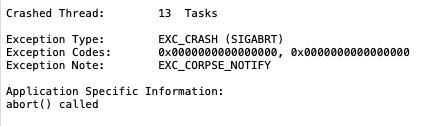
        Capture d’écran 2026-11-21 à 23.22.29.png

        David HealeyD 1 Reply Last reply Reply Quote 0
        • David HealeyD
          David Healey @Yannrog
          last edited by

          @Yannrog How did you get that crash report?

          Free HISE Bootcamp Full Course for beginners.
          YouTube Channel - HISE tutorials
          My Patreon - More HISE tutorials

          Y 1 Reply Last reply Reply Quote 0
          • Y
            Yannrog @David Healey
            last edited by

            @David-Healey When I export / compile the AU, Hise loads and Crash without opening the terminal.

            Then mac report shows up like usual app bugs

            David HealeyD 1 Reply Last reply Reply Quote 0
            • David HealeyD
              David Healey @Yannrog
              last edited by

              @Yannrog Are you referencing any of your images in your script?

              Free HISE Bootcamp Full Course for beginners.
              YouTube Channel - HISE tutorials
              My Patreon - More HISE tutorials

              Y 2 Replies Last reply Reply Quote 0
              • Y
                Yannrog @David Healey
                last edited by

                @David-Healey I may have miss something,

                I tried to replicate the tuto on how to import image into preset browser, for bank column.

                I have this lines ```
                namespace PresetBrowser
                {
                const NUM_BANKS = 7;

                Engine.loadImageIntoPool("*");
                
                const laf = Content.createLocalLookAndFeel();
                
                for (i = 0; i < NUM_BANKS; i++)	
                	laf.loadImage("{PROJECT_FOLDER}banke" + (i + 1) + ".png", "banke" + (i + 1));
                
                David HealeyD 1 Reply Last reply Reply Quote 0
                • Y
                  Yannrog @David Healey
                  last edited by

                  @David-Healey It seems to be a png error, or corrupted png file, I will try to remake then properly and see. maybe one of those is a fake png or something

                  1 Reply Last reply Reply Quote 0
                  • David HealeyD
                    David Healey @Yannrog
                    last edited by

                    @Yannrog Try commenting that out and see if the error goes away

                    Free HISE Bootcamp Full Course for beginners.
                    YouTube Channel - HISE tutorials
                    My Patreon - More HISE tutorials

                    Y 2 Replies Last reply Reply Quote 0
                    • Y
                      Yannrog @David Healey
                      last edited by

                      @David-Healey I will try it

                      1 Reply Last reply Reply Quote 0
                      • Y
                        Yannrog @David Healey
                        last edited by Yannrog

                        @David-Healey Do you want to laugh?

                        This is actually really hard to find.

                        The problem that causes the issue was a file in the image folder that contains 0 data. 0 pixel
                        It was a “.DS_Store“ hidden, this is a normal file create by the finder to store data.
                        But Hise tried to export it.

                        Sooooo silly haha,

                        It compiles well now.

                        I had to delete it with terminal and absolutely not reopen the image folder before exported or it will automatically recreate the DS Store file.

                        1 Reply Last reply Reply Quote 0
                        • First post
                          Last post

                        5

                        Online

                        3.1k

                        Users

                        14.0k

                        Topics

                        122.1k

                        Posts