Crash when compiling AU
-
@Yannrog Compile it directly in xcode and you'll see the error output
-
@David-Healey It seems to compile at the moment, I will see what happens
Thank you, I am grateful. I learn so much, thank you so much David.
God bless you
-
@David-Healey It compiles however I have no GUI in the DAW.
In Hise it seems to crash when in the export it says “writing {PROJECT_FOLDER “name of a png“ }.
Some pngs are writing fine before it crashes
-
@Yannrog Have you enabled the option in project preferences to embed the images?
-
@David-Healey yes images are embed,
The crash is a EXC_CRASH (SIGABRT)
Error Code: 0x02000148
Trap Number: 133 -
@Yannrog The projects that compile successfully have images/filmstrips?
-
@David-Healey yes,
here is a details.
Maybe it is about png, or somethng?
-
@Yannrog said in Crash when compiling AU:
The crash is a EXC_CRASH (SIGABRT)
Where is this coming from?
-
@David-Healey This is the report of mac report. But where do I find where does it come from?
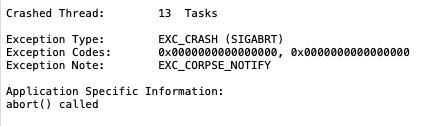
-
@Yannrog How did you get that crash report?
-
@David-Healey When I export / compile the AU, Hise loads and Crash without opening the terminal.
Then mac report shows up like usual app bugs
-
@Yannrog Are you referencing any of your images in your script?
-
@David-Healey I may have miss something,
I tried to replicate the tuto on how to import image into preset browser, for bank column.
I have this lines ```
namespace PresetBrowser
{
const NUM_BANKS = 7;Engine.loadImageIntoPool("*"); const laf = Content.createLocalLookAndFeel(); for (i = 0; i < NUM_BANKS; i++) laf.loadImage("{PROJECT_FOLDER}banke" + (i + 1) + ".png", "banke" + (i + 1));