Custom filter graph output within a custom node?
-
Does anyone know a good guide or the latest advice on doing a custom filter graph output for a custom node, so that I can have a floating tile or a script panel pick it up and draw it??
Musician - Instrument Designer - Sonic Architect - Creative Product Owner
Crafting sound at every level. From strings to signal paths, samples to systems. -
@Orvillain There's a tutorial for creating your own custom Floating Tile, but it's geared towards UI Components: https://github.com/christophhart/hise_tutorial/tree/master/ExternalFloatingTileTest
-
This thread:
https://forum.hise.audio/topic/9788/hise-filter-display-inconsistencies/20?_=1750768491529And Claude, helped quite a bit. Got it working!
The essential bits I'm calling in my c++ node are:
void setExternalData(const ExternalData& d, int index) override { SNEX_INIT_FILTER(d, index); } // HISE calls this (message thread, on repaint) for each frequency point. // freqNorm is normalised to the sample rate (1.0 == fs); return linear gain. double getPlotValue(int /*getMagnitude*/, double freqNorm) override { return (double) magnitudeLinear((float)(freqNorm * fs)); } // == Parameters ========================================================== template <int P> void setParameter(double v) { if constexpr (P == 0) { pFreq = (float)v; sendCoefficientUpdateMessage(); } else if constexpr (P == 1) { pReso = (float)v; sendCoefficientUpdateMessage(); } else if constexpr (P == 2) { pGain = (float)v; sendCoefficientUpdateMessage(); } else if constexpr (P == 3) { pDrive = (float)v; sendCoefficientUpdateMessage(); } else if constexpr (P == 4) { pType = (float)v; sendCoefficientUpdateMessage(); } else if constexpr (P == 5) { pMode = (float)v; sendCoefficientUpdateMessage(); } } -
Yes that's right.
By the way it won't work for nonlinear filters, it's designed to get the frequency response from simple analytic (linear) filters. And so if you want to draw any complex filter responses, you'll have to approximate the frequency response using a different cheap filter (see below)Also if its a polyphonic filter, you might want to make sure that only one persistent graphing filter instance exists, rather than having the graph be fed by a bank of polyphonic filters all fighting for attention. You can then use the hise voice system to decide which voices control the graph (first voice only, or latest voice only) that kind of thing.
Here is how I do it currently for my filters, although there is talk of this graphing system being updated for Hise in the future, so this might all change...
(simplified cut down code excerpt from one of my large experimental filter nodes)
// ==============================| Griffin Poly EQ Filter |=================================== // // File: Griffin_EQFilter_Poly.h // Node: Griffin_EQFilter_Poly // Package: Griffin DSP Essentials for HISE // Author: Griffinboy // HISE Forum: https://forum.hise.audio/user/griffinboy // Copyright: Copyright (c) 2026 Griffinboy // // Description: // Minimum-phase EQ filter with per-voice state and frame processing. // Designed for sample-accurate modulation in synthesis contexts. // Uses more CPU than the block-rate Griffin_EQFilter. // // Has Mod slots for frequency, Q, and gain. // // License: // GNU General Public License v3.0 or later (GPL-3.0-or-later). // // This file is part of Griffin DSP Essentials for HISE. // // This program is free software: you can redistribute it and/or modify it under the // terms of the GNU General Public License as published by the Free Software Foundation, // either version 3 of the License, or (at your option) any later version. // // This program is distributed in the hope that it will be useful, but WITHOUT ANY // WARRANTY; without even the implied warranty of MERCHANTABILITY or FITNESS FOR A // PARTICULAR PURPOSE. See the GNU General Public License for more details. // // You should have received a copy of the GNU General Public License along with this // program. If not, see <https://www.gnu.org/licenses/>. // // ================================================================================================ // SPDX-License-Identifier: GPL-3.0-or-later #pragma once #include <algorithm> #include <cmath> #include <JuceHeader.h> #include "src/griffinboy/modules/essentials/eq_filter/eq_filter.h" namespace project { using namespace juce; using namespace hise; using namespace scriptnode; template <int NV> struct Griffin_EQFilter_Poly: public data::filter_node_base { using VoiceState = griffin::modules::essentials::eq_filter::EQFilterFrameProcessor; using PlotModel = griffin::modules::essentials::eq_filter::EQPlotModel; using Defaults = griffin::modules::essentials::eq_filter::EQFilterDefaults; PolyData<VoiceState, NV> voices; PlotModel plotModel; SimpleReadWriteLock topologyLock; double plotSampleRate = 44100.0; SNEX_NODE(Griffin_EQFilter_Poly); struct MetadataClass { SN_NODE_ID("Griffin_EQFilter_Poly"); }; static constexpr bool isModNode() { return false; }; static constexpr bool isPolyphonic() { return NV > 1; }; static constexpr bool hasTail() { return true; }; static constexpr bool isSuspendedOnSilence() { return true; }; static constexpr int getFixChannelAmount() { return 2; }; static constexpr int NumTables = 0; static constexpr int NumSliderPacks = 0; static constexpr int NumAudioFiles = 0; static constexpr int NumFilters = 1; static constexpr int NumDisplayBuffers = 0; void prepare(PrepareSpecs specs) { SimpleReadWriteLock::ScopedWriteLock sl(topologyLock); voices.prepare(specs); for (auto& voice : voices) voice.prepare(specs.sampleRate, specs.blockSize); plotModel.prepare(specs.sampleRate); plotSampleRate = specs.sampleRate > 0.0 ? specs.sampleRate : 44100.0; if (auto fd = dynamic_cast<FilterDataObject*>(this->externalData.obj)) fd->setSampleRate(plotSampleRate); sendCoefficientUpdateMessage(); voiceManager.prepare(specs); voiceManager.setActive(1.0); } void reset() { SimpleReadWriteLock::ScopedWriteLock sl(topologyLock); for (auto& voice : voices) voice.reset(); voiceManager.reset(); } void handleHiseEvent(HiseEvent& e) { voiceManager.handleHiseEvent(e); } template <typename T> void process(T& data) { if (auto sl = SimpleReadWriteLock::ScopedTryReadLock(topologyLock)) { static constexpr int NumChannels = getFixChannelAmount(); auto& fixData = data.template as<ProcessData<NumChannels>>(); auto& voice = voices.get(); auto fd = fixData.toFrameData(); while (fd.next()) voice.processFrame(fd.toSpan()); voiceManager.process(data); } } template <typename T> void processFrame(T& data) { if (auto sl = SimpleReadWriteLock::ScopedTryReadLock(topologyLock)) voices.get().processFrame(data); } int handleModulation(double& value) { ignoreUnused(value); return 0; } double getPlotValue(int getMagnitude, double freqNorm) override { if (getMagnitude == 0) return 0.0; const auto frequency = std::clamp(freqNorm, 0.0, 0.5) * plotSampleRate; return plotModel.getMagnitudeAtFrequency(frequency); } void setExternalData(const ExternalData& data, int index) { data::filter_node_base::setExternalData(data, index); ignoreUnused(index); if (auto fd = dynamic_cast<FilterDataObject*>(data.obj)) fd->setSampleRate(plotSampleRate); sendCoefficientUpdateMessage(); } void createExternalModulationInfo(OpaqueNode::ModulationProperties& info) { modulation::ParameterProperties::ConnectionList list; auto addParameterSlot = [&list](int parameterIndex) { modulation::ConnectionInfo slot; slot.connectedParameterIndex = parameterIndex; slot.modColour = HiseModulationColours::ColourId::FX; slot.connectionMode = modulation::ConnectionMode::Parameter; slot.modulationMode = modulation::ParameterMode::ScaleAdd; list.push_back(slot); }; addParameterSlot(2); addParameterSlot(3); addParameterSlot(4); info.fromConnectionList(list); info.setModulationBlockSize(Defaults::modulationBlockSize); } template <int P> void setParameter(double v) { if constexpr (P == 0) { SimpleReadWriteLock::ScopedWriteLock sl(topologyLock); const auto nextShape = (int)std::round(v); applyToVoices( [nextShape](VoiceState& filter) { filter.setType(nextShape); }); updatePlotFromFirstVoice( [this, nextShape] { plotModel.setType(nextShape); }); } else if constexpr (P == 1) { SimpleReadWriteLock::ScopedWriteLock sl(topologyLock); const auto nextSlope = (int)std::round(v); applyToVoices( [nextSlope](VoiceState& filter) { filter.setSlopeMode(nextSlope); }); updatePlotFromFirstVoice( [this, nextSlope] { plotModel.setSlopeMode(nextSlope); }); } else if constexpr (P == 2) { const auto value = (float)v; applyToVoices( [value](VoiceState& filter) { filter.setFrequencyHz(value); }); updatePlotFromFirstVoice( [this, value] { plotModel.setFrequencyHz(value); }); } else if constexpr (P == 3) { const auto value = (float)v; applyToVoices( [value](VoiceState& filter) { filter.setQ(value); }); updatePlotFromFirstVoice( [this, value] { plotModel.setQ(value); }); } else if constexpr (P == 4) { const auto value = (float)v; applyToVoices( [value](VoiceState& filter) { filter.setGainDb(value); }); updatePlotFromFirstVoice( [this, value] { plotModel.setGainDb(value); }); } } void createParameters(ParameterDataList& data) { { parameter::data p("Shape", { 0.0, 6.0, 1.0 }); StringArray names; addTypeLabels(names); p.setParameterValueNames(names); registerCallback<0>(p); p.setDefaultValue((double)Defaults::type); data.add(std::move(p)); } { parameter::data p("Slope", { 0.0, 3.0, 1.0 }); StringArray names; addSlopeLabels(names); p.setParameterValueNames(names); registerCallback<1>(p); p.setDefaultValue((double)Defaults::slopeMode); data.add(std::move(p)); } { parameter::data p("Frequency", { 20.0, 20000.0, 0.01 }); p.setSkewForCentre(1000.0); p.info.textConverter = parameter::pod::TextValueConverters::Frequency; registerCallback<2>(p); p.setDefaultValue(Defaults::frequencyHz); data.add(std::move(p)); } { parameter::data p("Q", { 0.025, 25.0, 0.001 }); p.setSkewForCentre(0.70710678); registerCallback<3>(p); p.setDefaultValue(Defaults::q); data.add(std::move(p)); } { parameter::data p("Gain", { -30.0, 30.0, 0.01 }); p.info.textConverter = parameter::pod::TextValueConverters::Decibel; registerCallback<4>(p); p.setDefaultValue(Defaults::gainDb); data.add(std::move(p)); } } private: static constexpr int getNumTypes() noexcept { return griffin::modules::essentials::eq_filter::EQFilterDesign::getNumTypes(); } template <typename Function> void applyToVoices(Function&& function) { // PolyData iteration follows HISE's poly callback. // Each active voice receives the parameter update in its own DSP state. for (auto& voice : voices) function(voice); } template <typename Function> void updatePlotFromFirstVoice(Function&& function) { // The plot is shared UI state. The first HISE voice owns graph updates // so voices do not compete for the displayed response. if (! voices.isVoiceRenderingActive() || voices.isFirst()) { function(); sendCoefficientUpdateMessage(); } } static void addTypeLabels(StringArray& names) { names.add("Lowpass"); names.add("Highpass"); names.add("Bandpass"); names.add("Notch"); names.add("Bell"); names.add("Low Shelf"); names.add("High Shelf"); } static void addSlopeLabels(StringArray& names) { names.add("12 dB/oct"); names.add("24 dB/oct"); names.add("48 dB/oct"); names.add("96 dB/oct"); } envelope::silent_killer<NV> voiceManager; }; } // namespace project -
@Orvillain said in Custom filter graph output within a custom node?:
Does anyone know a good guide or the latest advice on doing a custom filter graph output for a custom node, so that I can have a floating tile or a script panel pick it up and draw it??
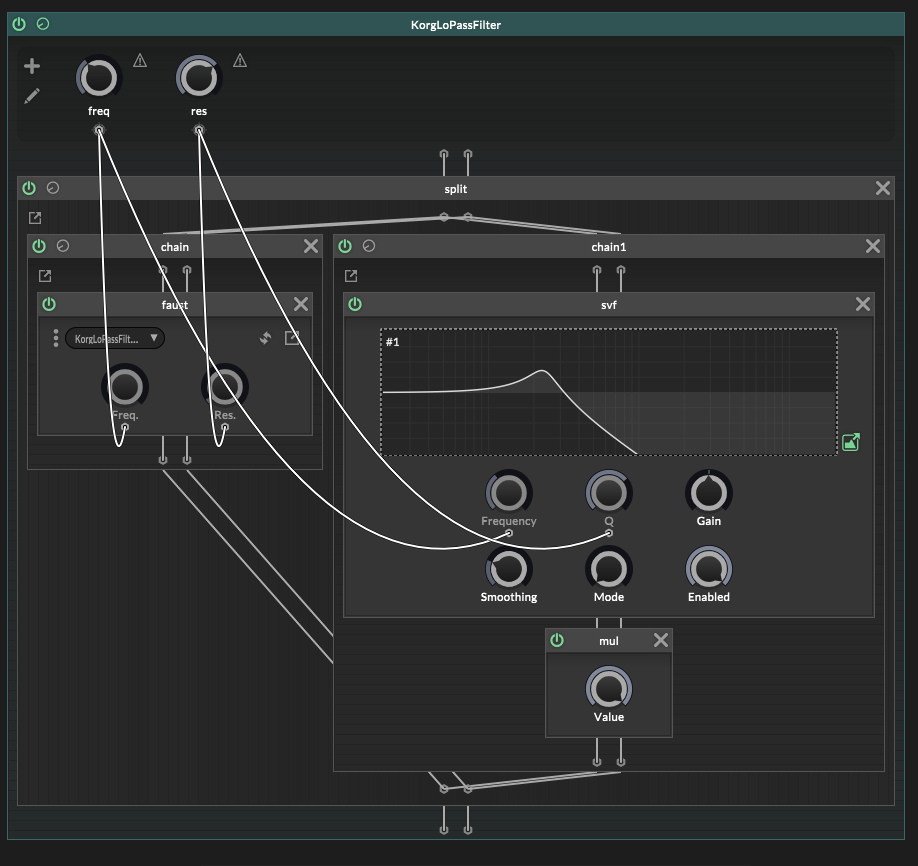
Im sure you've thought of this, and this is not for a custom node, its for Faust based filter where I wanted a display like the cough normal, filters - only trouble is it doesnt seem to display exactly the same acorss normal and these ascript node based filters
HISE Development for hire.
www.channelrobot.com -
Yeah thats another way to do it!
Basically the same idea.Except like you noted, the Hise filters (which I think are ports of the stock Juce ones?) are primitive, they cramp in the high end of the spectrum (the filter shape get warped near nyquist). And so that's not very nice to see on the graphs.
Plus, the trouble with analog style filters (if they are actually simulating the hardware topology) is that the cutoff frequency on the knob won't actually line up with the frequency in the real filter, the cutoff frequency on the graph won't really match the real frequency the filter is at internally.



