Exporting plugin with expansions?
-
Hi everyone,
I’m preparing to export my instrument and I want to make sure I’m structuring everything correctly before release. I’ve read the documentation and some forum threads, but I’m still unsure about the correct workflow in this situation.
Here is my current project setup:
- Main Project
All samples are stored in the MAIN project (Samples folder)
I also have AudioFiles such as:
-
Wavetables
-
Monolith files
-
One Reverb IR file in WAV format
-
Expansions
I have two expansions
Inside each expansion I only have:
-
SampleMaps
-
Presets / metadata
The actual samples used by those samplemaps are in the MAIN Samples folder
When I compile the plugin:
The expansions and presets appear correctly
But no samples load inside the presets
So I’m trying to understand the correct workflow for exporting and packaging the project.
My questions:
Is it valid to keep all samples in the MAIN project, while the expansions contain only SampleMaps and presets?
If yes, what is the correct way to export samples and expansions so that the compiled plugin can properly locate the samples?
Should the expansions also contain their own Samples folder, or is referencing the main Samples directory acceptable?
What is the recommended export workflow in this situation?
Compile plugin
Export Samples for Installer
Expansion packaging
Are AudioFiles like wavetables and a convolution IR (.wav) safe to keep in the main project without converting them to monolith?
Any advice on the proper folder structure and export workflow would be greatly appreciated.
Thanks!
-
@filipalex96 said in Exporting plugin with expansions?:
The actual samples used by those samplemaps are in the MAIN Samples folder
The expansion's samples should be in the expansion's folder.
Free HISE Bootcamp Full Course for beginners.
YouTube Channel - HISE tutorials
My Patreon - More HISE tutorials -
@David-Healey Thank you for the reply, I really appreciate the help.
Sorry if this is a stupid question, but I want to make sure I understand correctly.
When you say “The expansion's samples should be in the expansion's folder”, do you mean that each expansion must contain its own Samples folder with the actual audio samples inside it, like this?
Example structure:
Expansion1
Samples
SampleMaps
Presets
Expansion2
Samples
SampleMaps
Presets
Right now in my project all the samples are stored in the MAIN project Samples folder, and inside the expansions I only have SampleMaps and presets that reference those samples.
-
@filipalex96 said in Exporting plugin with expansions?:
do you mean that each expansion must contain its own Samples folder with the actual audio samples inside i
Yes.
I made a video a while back about expansions that you might find useful:
I also posted a video on Patreon a couple of weeks ago about building an expansion installer.
-
@David-Healey I watched the tutorial and followed the steps shown there, but I think I must be doing something wrong somewhere.
Do I need to export the expansions in a specific way, or is there an extra step required before compiling the plugin?
Also, in Expansion Type I selected Full Expansions. Maybe this is where I made a mistake?
Sorry if this is a basic question, I’m just trying to understand the correct workflow and I might be misunderstanding something.
Thanks for the help!
-
@filipalex96 The docs cover most of what you're asking: https://docs.hise.audio/working-with-hise/project-management/expansions/index.html
You probably don't want Full Expansions, you probably want Encrypted.
-
@David-Healey Thanks, I’ll take a closer look tomorrow and get back with an update.
-
@David-Healey said in Exporting plugin with expansions?:
@filipalex96 said in Exporting plugin with expansions?:
The actual samples used by those samplemaps are in the MAIN Samples folder
The expansion's samples should be in the expansion's folder.
Well..... not the way I do it....you can put the samples in the Linkfile directory - where all your factory samples are, so in your sample map it just looks sorta normal e.g.
FileName="{PROJECT_FOLDER}fatty_F#4.wav"
Essentially the sample map tells HISE where the sample data is by using this {PROJECT_FOLDER} token, which means "the folder wherever the end user decided to keep the samples, who's location can be found in the Link file"
You just need to tell your sampler where the sample maps are.... it already knows about your factory sample maps - they are shipped in the plugin, so you just need to tell it where each expansions maps are...
So you will need some meta data to differentiate your "factory" maps from each of your expansion maps, so my factory meta data for this location looks like this:
{ "VoiceMapName": "FireBreak" }- note theres no actual location data in here, HISE, and your product already know about this map so none is needed.
whilst my expansion meta data looks like this, for an expansion called AlarmSemaphores:
{
      "VoiceMapName": "{EXP::AlarmSemaphores}AS_Absentees"
}
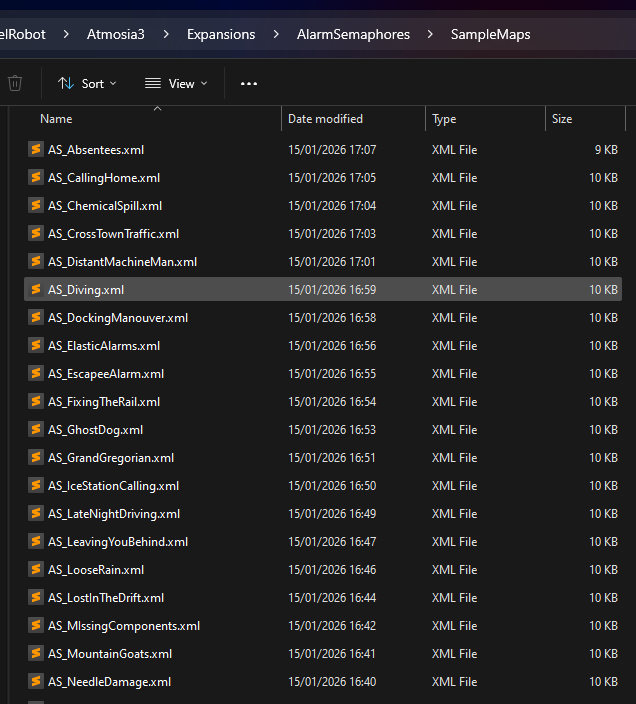
OK so another of these token things.. this time {EXP::expansion folder name}, which tells HISE, and your product to go look in the expansions folder for a sub folder called AlarmSemaphores, and there to look in the SampleMaps folder
So at this point you only need to set the expansion type to FilesOnly and have a way to place each expansions folder structure, which is entirely empty except for the sampleMaps folder which holds all the sample maps for your expansion.
So your Expansion installer will need to:
-
copy the sample data (.ch1 files) to the Linkfolder
-
Create a folder structure in the products Expansion folder
Here's an example:
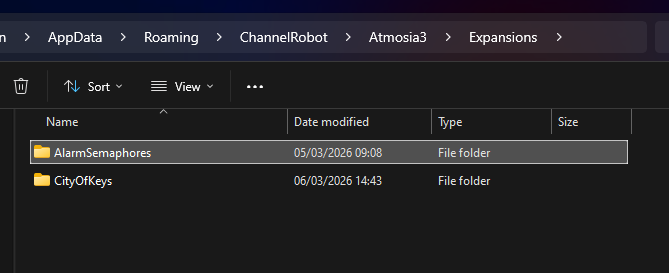
-
Inside each expansion folder create the std expansion folder structure:
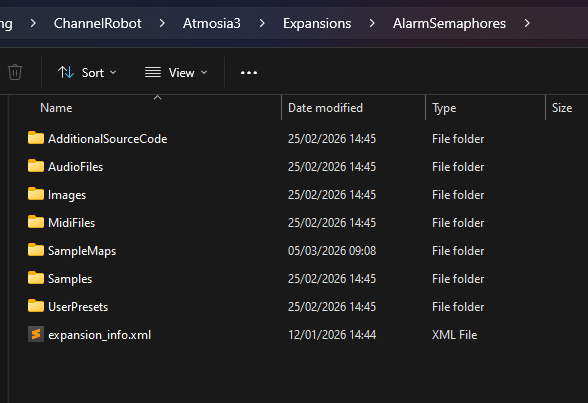
-
inside the SampleMaps folder add the sample maps:
- Create some meta data file that describes these maps and where they are so your product can find them...
If all of this is "too hard" then once the Asset Manager is up and running I will add a (for fee) version of this system so getting up and running should be pretty painless...I've been using it on HoriZEN, and now Atmosia 3 for over a year and it seems to work fine.

