How can I make authentic chiptune sound via waveform generator?
-
Tbh I also wanted too add waveform editor (just like Namco163 NES add-on). Rn trying figure out how to done it. But if you have any ideas how to do it, you can post your assumptions.
-
you need to be more specific on what you want to achieve? i am glad to help, as this community has also helped me a lot, but i need more information?
Btw shall i do a written tutorial on how to combine c++ nodes with your project ? Would the community be interested in that ?
-
@Ben-Catman said in How can I make authentic chiptune sound via waveform generator?:
Btw shall i do a written tutorial on how to combine c++ nodes with your project ? Would the community be interested in that ?
more useful documentation is always welcome.
Maybe use an Air windows C++ FX as your example...
-
@Ben-Catman
Okay, let me explain:
I want to create a VST plugin for composing chiptune music. The reason: existing plugins don't meet my needs.At first, I tried using a sampler to create five basic waveform types: Square, Triangle, Sawtooth, Sine, and Noise. But then I ran into a problem: the user would have to download samples to use the VST plugin (which doesn't suit me, as it doesn't make sense with simple waveforms).
Then I remembered the waveform generator and tried to do everything with it, but it uses a synthesizer to generate the waves, which makes the waves smoother. This doesn't match the authentic sound.The video I linked above shows what the waveform should look like.
In other words, I want to make a copy of the Magical 8bit Plugin, but with Sawtooth and Sine waveforms and I want to keep all sethings of the waveform.
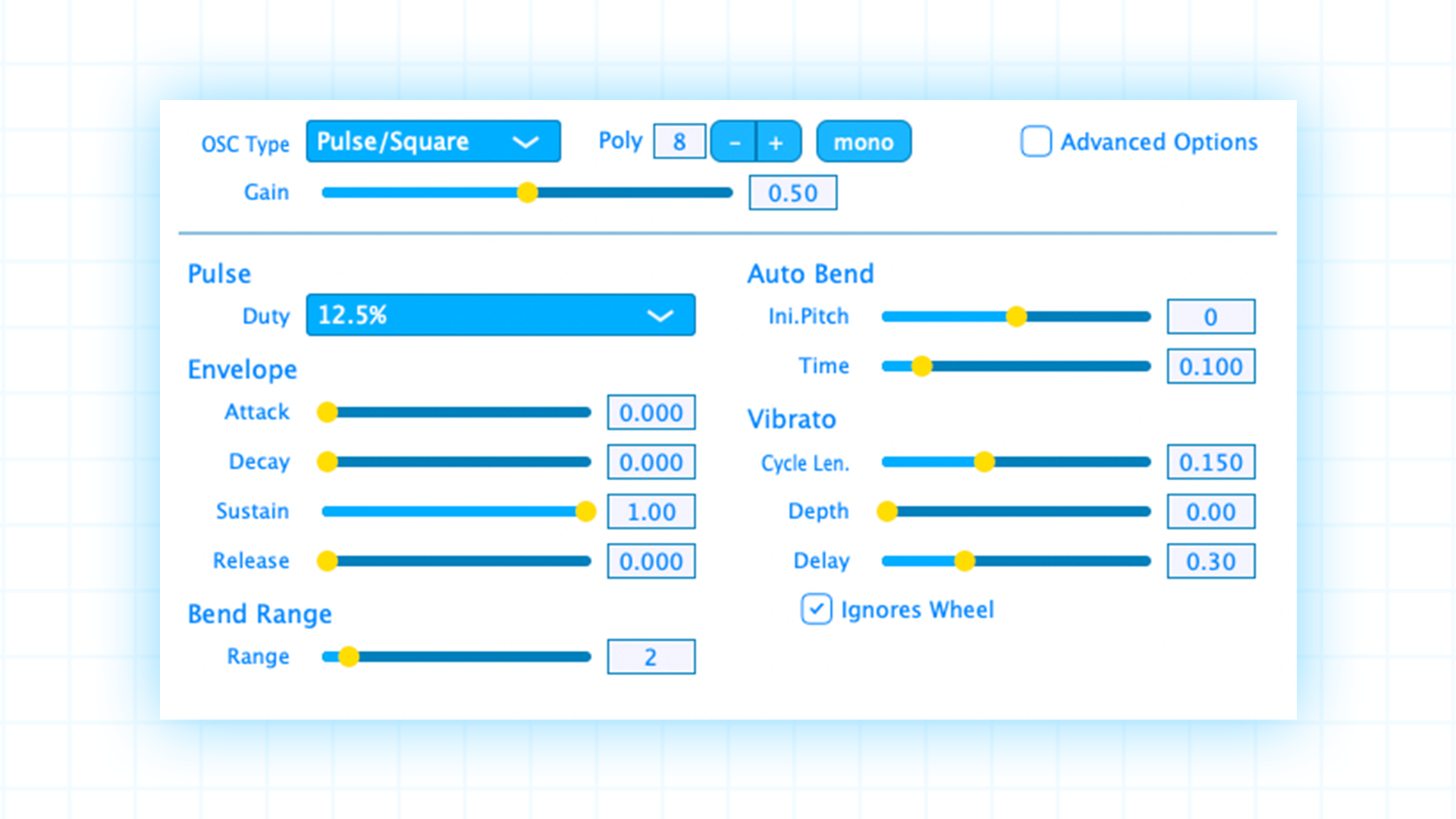
-
I heard that Magical 8bit plug was made with JUICE, so I don't think that could be a big problem.
Also, I'm not really good at coding. Yeah...
-
@Ben-Catman
Anyway, I want you to help me with the code, please. -
well i get it, but one thing i want to mention in advance is , that i would not want my (simple) code to be used in projects that are public. As you mentioned , you want "the user" not to force to install samples. That implies for me that you want to distribute the vst.
COMMUNITY: What would you do ? I really want to help, but if this project is not for personal use, i have some problems with that.
Anyways, - First you need to create the waveform itself - then you need to downsample and bitcrush it, depending on your needs.
-
as i have read quite a few times there is need for a low / highpass with steeper slopes.... i could give the community the code and everything and show them how to implement that as third party c++ node, if that helps.
Pretty sure soon a kind of AI will help us all with that part of the job, but as long as we dont have this feature, i am more than willing to help others
Cheers
-
@Ben-Catman
I don't plan to distribute it right now. For now, I just want the plugin to work without any problems. If the VST works well, I'd like to make it public (something like making a YouTube video and leaving a Google Drive link where it can be downloaded). And it will be ABSOLUTELY FREE.If you'd like, I can credit you as the coder. Or leave a link to your social media accounts.
In any case, I don't currently plan to release it publicly for now. As I said before, I just want it to work well.
-
okok, tehre you go:
here is a short explaination -
It combines Sample Rate Reduction (Sample & Hold) and Bit Depth Quantization in a single SNEX node.How it works:The node processes audio in two distinct stages to achieve that classic "crushed" digital sound.
1. Sample Rate Reduction (Temporal Distortion)Instead of processing every incoming sample, the node "freezes" the amplitude for a set number of samples using a counter and a buffer.The Logic:
- A holdCounter tracks the "steps." When it hits zero, it grabs a new "snapshot" of the input signal and stores it in holdLeft/Right.The Result: This creates a "staircase" waveform. In the frequency domain, this introduces Aliasing, giving it that metallic, ringing Lo-Fi character.
2. Bit Depth Reduction (Amplitude Quantization)This stage reduces the dynamic resolution of the signal, simulating older AD/DA converters (like 8-bit or 12-bit systems).
The Math:
- We calculate the available "steps" based on the bit depth
2. We scale the signal up, round it to the nearest integer, and scale it back down
The Result: This introduces Quantization Noise and "fuzziness," especially audible on tails and quiet signals.
template <typename T> void processFrame(T& data)
        {
            // --- Sample Rate Reduction (Sample & Hold) ---
            int divider = jmax(1, (int)srDivider);

            if (holdCounter <= 0)
            {
                holdLeft = data[0];
                holdRight = data[1];
                holdCounter = divider;
            }
            holdCounter--;

            float outL = holdLeft;
            float outR = holdRight;

            // --- Bit Crusher ---

            float steps = std::pow(2.0f, bitDepth) - 1.0f;  // calculate steps
            steps = jmax(1.0f, steps);

            outL = std::round(outL * steps) / steps;
            outR = std::round(outR * steps) / steps;

            data[0] = outL;
            data[1] = outR;
        }

        int handleModulation(double& ) { return 0; }
        void setExternalData(const ExternalData& , int ) {}

        // -------------------------------------------------------------------------
        // Parameters:  0 = BitDepth  |  1 = SampleRateReduction
        // -------------------------------------------------------------------------
        template <int P> void setParameter(double v)
        {
            if constexpr (P == 0)   // Bit Depth  (1 – 16)
                bitDepth = (float)jlimit(1.0, 16.0, v);

            if constexpr (P == 1)   // SR Divider (1 – 32)
                srDivider = (float)jlimit(1.0, 32.0, v);
        }
Play around with the settings, and you will get the classic NES - Sound :)
I can gice you the .h files if you send me a dm
Cheers Ben
-
@Ben-Catman
Hi again! So, I tried to compile it, but it gives me this error. Did I do something wrong?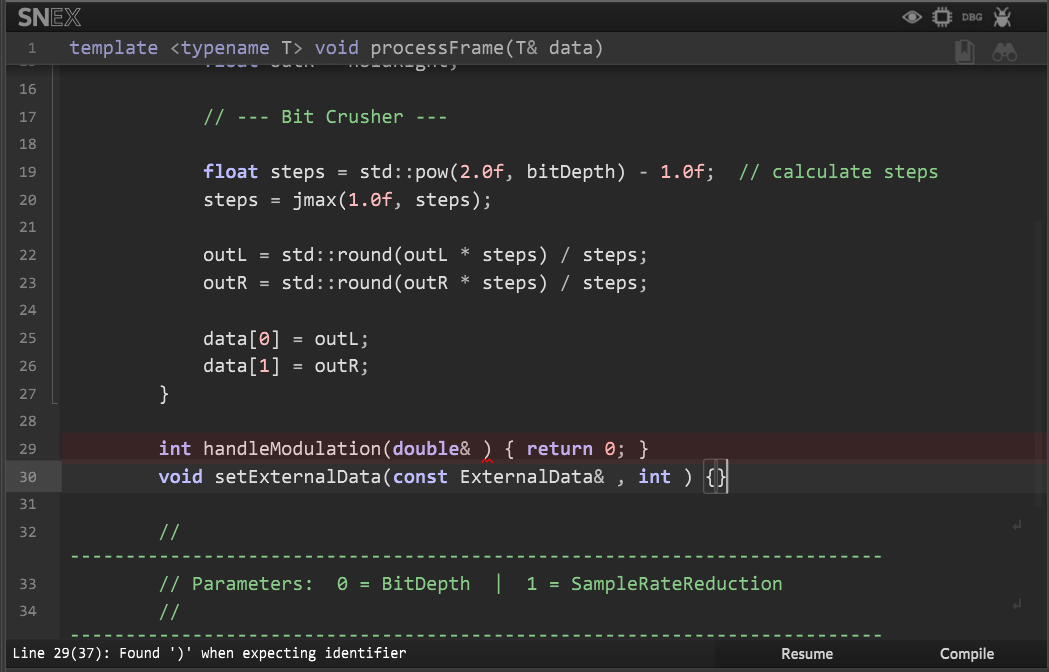
-
it also hapenning here:

-
a no - you need to create a third party c++ node template
--> 1.) Go to Tools -> create C++ third party node template
--> 2.) name it EXACTLY: chipTuner
--> 3.) this will create the chipTuner.h file. Open it with Visual Studio or even Notepad and clear everything
--> 4.) Copy the code below into the file, save and close it
--> 5.) back in HISE go to Export-> Compile DSP Networks as DLL
--> 6.) You can now go into the FX Section and load a Hardcoded Master Effect -> there you can choose the chiptuner effectMy advise, play with settings like Bit depth = 4 and SR Reduction = 8
#pragma once
#include <JuceHeader.h>

namespace project
{
    using namespace juce;
    using namespace hise;
    using namespace scriptnode;

    template <int NV> struct chipTuner : public data::base
    {
        SNEX_NODE(chipTuner);
        struct MetadataClass { SN_NODE_ID("chipTuner"); };

        static constexpr bool isModNode() { return false; }
        static constexpr bool isPolyphonic() { return NV > 1; }
        static constexpr bool hasTail() { return false; }
        static constexpr bool isSuspendedOnSilence() { return true; }
        static constexpr int  getFixChannelAmount() { return 2; }

        static constexpr int NumTables = 0;
        static constexpr int NumSliderPacks = 0;
        static constexpr int NumAudioFiles = 0;
        static constexpr int NumFilters = 0;
        static constexpr int NumDisplayBuffers = 0;

        // -------------------------------------------------------------------------
        // Parameter State
        // -------------------------------------------------------------------------
        float bitDepth = 8.0f;   // 1 – 16 Bit
        float srDivider = 1.0f;   // 1 – 32 (sample rate reduction factor)

        // Sample-Hold state
        float holdLeft = 0.0f;
        float holdRight = 0.0f;
        int   holdCounter = 0;

        // -------------------------------------------------------------------------
        // Callbacks
        // -------------------------------------------------------------------------
        void prepare(PrepareSpecs ) { reset(); }

        void reset()
        {
            holdLeft = 0.0f;
            holdRight = 0.0f;
            holdCounter = 0;
        }

        void handleHiseEvent(HiseEvent& ) {}

        template <typename T> void process(T& data)
        {
            static constexpr int NumChannels = getFixChannelAmount();
            auto& fixData = data.template as<ProcessData<NumChannels>>();
            auto fd = fixData.toFrameData();
            while (fd.next())
                processFrame(fd.toSpan());
        }

        template <typename T> void processFrame(T& data)
        {
            // --- Sample Rate Reduction (Sample & Hold) ---
            int divider = jmax(1, (int)srDivider);

            if (holdCounter <= 0)
            {
                holdLeft = data[0];
                holdRight = data[1];
                holdCounter = divider;
            }
            holdCounter--;

            float outL = holdLeft;
            float outR = holdRight;

            // --- Bit Crusher ---

            float steps = std::pow(2.0f, bitDepth) - 1.0f;  // eg 8 Bit → 255 steps
            steps = jmax(1.0f, steps);

            outL = std::round(outL * steps) / steps;
            outR = std::round(outR * steps) / steps;

            data[0] = outL;
            data[1] = outR;
        }

        int handleModulation(double& /*value*/) { return 0; }
        void setExternalData(const ExternalData& /*data*/, int /*index*/) {}


        template <int P> void setParameter(double v)
        {
            if constexpr (P == 0)   // Bit Depth  (1 – 16)
                bitDepth = (float)jlimit(1.0, 16.0, v);

            if constexpr (P == 1)   // SR Divider (1 – 32)
                srDivider = (float)jlimit(1.0, 32.0, v);
        }

        void createParameters(ParameterDataList& data)
        {
            // Bit Depth
            {
                parameter::data p("Bit Depth", { 1.0, 16.0, 1.0 });
                registerCallback<0>(p);
                p.setDefaultValue(8.0);
                p.setParameterValueNames({});
                data.add(std::move(p));
            }
            // Sample Rate Reduction
            {
                parameter::data p("SR Reduction", { 1.0, 32.0, 1.0 });
                registerCallback<1>(p);
                p.setDefaultValue(4.0);
                data.add(std::move(p));
            }
        }
    };
}
