Forum
    • Categories
    • Register
    • Login

    The Death Crash || Prevention?

    Scheduled Pinned Locked Moved Scripting
    15 Posts 2 Posters 985 Views
    Loading More Posts
    • Oldest to Newest
    • Newest to Oldest
    • Most Votes
    Reply
    • Reply as topic
    Log in to reply
    This topic has been deleted. Only users with topic management privileges can see it.
    • David HealeyD
      David Healey @Chazrox
      last edited by

      @Chazrox said in The Death Crash || Prevention?:

      Could that have been the problem that the script ran before commiting the change?

      Not sure what you mean by committing the change.

      Scripts are saved when you press F5 so if you didn't do that it wouldn't be saved.

      Free HISE Bootcamp Full Course for beginners.
      YouTube Channel - Public HISE tutorials
      My Patreon - HISE tutorials

      ChazroxC 1 Reply Last reply Reply Quote 0
      • ChazroxC
        Chazrox @David Healey
        last edited by

        @d-healey I have a button running the script at the time. I was using the button the script was working. I made some changes in the script and pressed the button again.

        What I mean by running the script is pressing the button before pressing F5 again after changing the script.

        Would it have read the changes in the code editor or ran what was last commited?

        David HealeyD 1 Reply Last reply Reply Quote 0
        • David HealeyD
          David Healey @Chazrox
          last edited by

          @Chazrox If you'd pressed F5 even once and saved your project then the script shouldn't have been wiped. Sounds like a bug, if you can find a way to reproduce it that would be helpful.

          Free HISE Bootcamp Full Course for beginners.
          YouTube Channel - Public HISE tutorials
          My Patreon - HISE tutorials

          ChazroxC 1 Reply Last reply Reply Quote 0
          • ChazroxC
            Chazrox @David Healey
            last edited by Chazrox

            @d-healey I did save an .xml and even tho I made multiple changes and saves to that file and pressed F5 a bunch of times. It just decided to do that. The saved .xml file is in fact wiped.

            its a habbit to cmd+s, AND cmd+shift+s after every change.

            David HealeyD 1 Reply Last reply Reply Quote 0
            • David HealeyD
              David Healey @Chazrox
              last edited by

              @Chazrox said in The Death Crash || Prevention?:

              The saved .xml file is in fact wiped.

              The project xml is wiped and the script file is wiped?

              Free HISE Bootcamp Full Course for beginners.
              YouTube Channel - Public HISE tutorials
              My Patreon - HISE tutorials

              ChazroxC 1 Reply Last reply Reply Quote 0
              • ChazroxC
                Chazrox @David Healey
                last edited by

                @d-healey the .xml file is still there and shows in my saved menu but when I open the .xml file in a text editor its empty.

                David HealeyD 1 Reply Last reply Reply Quote 0
                • David HealeyD
                  David Healey @Chazrox
                  last edited by

                  @Chazrox said in The Death Crash || Prevention?:

                  the .xml file is still there and shows in my saved menu

                  There are two xml files, one for the UI data and one for the module tree. When you say it's empty, do you mean it's a completely empty file?

                  What about the script file?

                  Free HISE Bootcamp Full Course for beginners.
                  YouTube Channel - Public HISE tutorials
                  My Patreon - HISE tutorials

                  ChazroxC 1 Reply Last reply Reply Quote 0
                  • ChazroxC
                    Chazrox @David Healey
                    last edited by

                    @d-healey

                    The files I checked were in these directories:

                    Project Folder/ Presets/ Project.hip
                    Project Folder/ XMLPresetBackups / project.xml
                    Project Folder/ Scripts / ScriptProcessors / project.xml

                    the script looks like this in those files:

                    include("SliderPackPRINTERbyRGLIDES.js");


                    function onNoteOn()
                    {
                    	
                    }
                     function onNoteOff()
                    {
                    	
                    }
                     function onController()
                    {
                    	
                    }
                     function onTimer()
                    {
                    	
                    }
                     function onControl(number, value)
                    {
                    	
                    }
                    

                    the include.js here is also wiped.
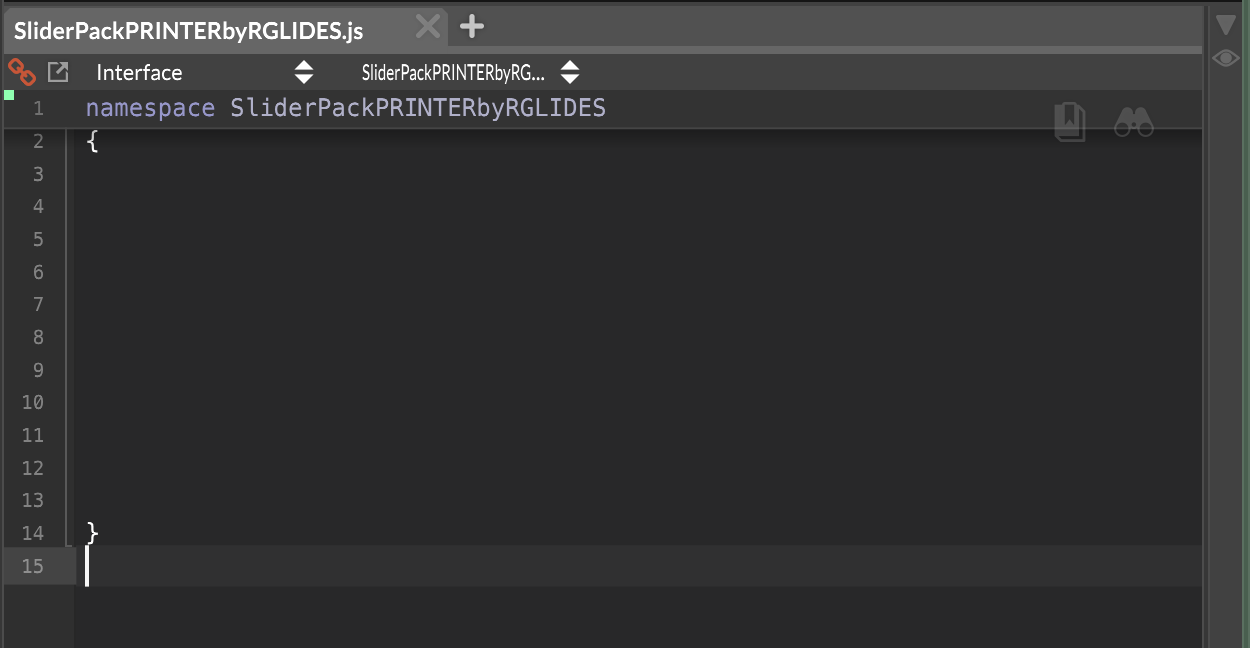
                    Screenshot 2025-07-13 at 3.37.38 AM.png

                    No shade on @rglides because he gave me a working script so we're clear. lol. I was tinkering.

                    David HealeyD 1 Reply Last reply Reply Quote 0
                    • David HealeyD
                      David Healey @Chazrox
                      last edited by

                      @Chazrox said in The Death Crash || Prevention?:

                      Project Folder/ Scripts / ScriptProcessors / project.xml

                      There shouldn't be an xml in the Scripts folder.

                      Free HISE Bootcamp Full Course for beginners.
                      YouTube Channel - Public HISE tutorials
                      My Patreon - HISE tutorials

                      ChazroxC 1 Reply Last reply Reply Quote 0
                      • ChazroxC
                        Chazrox @David Healey
                        last edited by Chazrox

                        @d-healey sorry thats a .js file. Its still Empty. Everything with the project name on it is reset to default.

                        1 Reply Last reply Reply Quote 0
                        • David HealeyD
                          David Healey
                          last edited by

                          Ok so it looks like there is a critical bug here. Are you able to recreate the crash?

                          Free HISE Bootcamp Full Course for beginners.
                          YouTube Channel - Public HISE tutorials
                          My Patreon - HISE tutorials

                          ChazroxC 1 Reply Last reply Reply Quote 0
                          • ChazroxC
                            Chazrox @David Healey
                            last edited by

                            @d-healey super critical. Good thing I back up the entire project folder after ever new function added. I'll lose a few hours of work at most. I'll see about recreating that.


                            1 Reply Last reply Reply Quote 1
                            • First post
                              Last post

                            19

                            Online

                            2.1k

                            Users

                            13.2k

                            Topics

                            114.8k

                            Posts