Forum
    • Categories
    • Register
    • Login

    ACCESS AUDIO FILES SUB FOLDER:

    Scheduled Pinned Locked Moved Solved Scripting
    16 Posts 2 Posters 1.7k Views
    Loading More Posts
    • Oldest to Newest
    • Newest to Oldest
    • Most Votes
    Reply
    • Reply as topic
    Log in to reply
    This topic has been deleted. Only users with topic management privileges can see it.
    • David HealeyD
      David Healey @Chazrox
      last edited by

      @Chazrox Loop over the audioFiles array and only add the items you want to the combo box. You can use .contains() and .substring() to get only the text you want.

      Free HISE Bootcamp Full Course for beginners.
      YouTube Channel - Public HISE tutorials
      My Patreon - HISE tutorials

      ChazroxC 1 Reply Last reply Reply Quote 0
      • ChazroxC
        Chazrox @David Healey
        last edited by Chazrox

        @d-healey am I doing this right?
        its loading the combobox properly but loading the audio from 'Audio Files' instead of 'Subber' folder.

        const var cmbSubs = Content.getComponent("cmbSubs");
        const var subs = Engine.loadAudioFilesIntoPool();
        
        cmbSubs.set("items","");
        	
        for (x in subs)
        		if (x.contains("SUB_"))
        		cmbSubs.addItem(x.replace("{PROJECT_FOLDER}Subber").replace(".wav").replace(".WAV").replace(".aif").replace("/"));


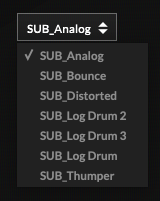
        Correct Files:
        Screenshot 2025-04-22 at 7.52.10 AM.png

        Wrong Files:
        Screenshot 2025-04-22 at 7.52.14 AM.png

        David HealeyD 1 Reply Last reply Reply Quote 0
        • David HealeyD
          David Healey @Chazrox
          last edited by David Healey

          @Chazrox Use {} with your for loops and if statements.

          Show me the code that does the loading.

          Free HISE Bootcamp Full Course for beginners.
          YouTube Channel - Public HISE tutorials
          My Patreon - HISE tutorials

          ChazroxC 1 Reply Last reply Reply Quote 0
          • ChazroxC
            Chazrox @David Healey
            last edited by Chazrox

            @d-healey

            const var cmbSubs = Content.getComponent("cmbSubs");
            const var subs = Engine.loadAudioFilesIntoPool();
            const var audioKickSub = Synth.getAudioSampleProcessor("Kick Sub");
            
            inline function oncmbSubsControl(component, value)
            {
            	if (value > 0)
            	audioKickSub.setFile(subs[value-1]);
            
            };
            
            Content.getComponent("cmbSubs").setControlCallback(oncmbSubsControl);
            
            cmbSubs.set("items","");
            	
            for (x in subs)
            		if (x.contains("SUB_"))
            		{
            			cmbSubs.addItem(x.replace("{PROJECT_FOLDER}Subber").replace(".wav").replace(".WAV").replace(".aif").replace("/").replace("SUB_"));
            						
            		}


            its "subs" thats messing it up isnt it? Its pulling from the entire array and value 1 from that list right?
            That just crossed my mind.

            David HealeyD 1 Reply Last reply Reply Quote 0
            • David HealeyD
              David Healey @Chazrox
              last edited by David Healey

              @Chazrox

              Like this

              for (x in subs)
              {
                  if (x.contains("SUB_"))
                  {
              		cmbSubs.addItem(x.replace("{PROJECT_FOLDER}Subber").replace(".wav").replace(".WAV").replace(".aif").replace("/").replace("SUB_"));			
                  }
              }
              

              @Chazrox said in ACCESS AUDIO FILES SUB FOLDER::

              its "subs" thats messing it up isnt it? Its pulling from the entire array and value 1 from that list right?
              That just crossed my mind.

              Yeah I think you're right. So when you loop over the array of audio files and pull out the values for your combo box, you also need to put those audio files (the sub ones) into a separate array.

              Free HISE Bootcamp Full Course for beginners.
              YouTube Channel - Public HISE tutorials
              My Patreon - HISE tutorials

              ChazroxC 1 Reply Last reply Reply Quote 0
              • ChazroxC
                Chazrox @David Healey
                last edited by

                @d-healey can you help me with the loop? I cant figure that one out rn. I've never done a loop inside of a loop before.

                David HealeyD 1 Reply Last reply Reply Quote 0
                • David HealeyD
                  David Healey @Chazrox
                  last edited by

                  @Chazrox said in ACCESS AUDIO FILES SUB FOLDER::

                  I've never done a loop inside of a loop before.

                  You don't need to.

                  for (x in audioFiles)
                  {
                      if (x.contains("SUB_"))
                      {
                  		cmbSubs.addItem(x.replace("{PROJECT_FOLDER}Subber").replace(".wav").replace(".WAV").replace(".aif").replace("/").replace("SUB_"));			
                          subArray.push(x);
                      }
                  }
                  

                  Free HISE Bootcamp Full Course for beginners.
                  YouTube Channel - Public HISE tutorials
                  My Patreon - HISE tutorials

                  ChazroxC 2 Replies Last reply Reply Quote 1
                  • ChazroxC
                    Chazrox @David Healey
                    last edited by

                    @d-healey Working! Thank you!

                    const var cmbSubs = Content.getComponent("cmbSubs");
                    const var subs = Engine.loadAudioFilesIntoPool();
                    const var audioKickSub = Synth.getAudioSampleProcessor("Kick Sub");
                    
                    cmbSubs.set("items","");
                    	
                    const var subArray = [];
                    	
                    for (x in subs)
                    {
                        if (x.contains("SUB_"))
                        {
                    		cmbSubs.addItem(x.replace("{PROJECT_FOLDER}Subber").replace(".wav").replace(".WAV").replace(".aif").replace("/").replace("SUB_"));			
                            subArray.push(x);
                        }
                    }
                    
                    inline function oncmbSubsControl(component, value)
                    {
                    	if (value > 0)
                    	audioKickSub.setFile(subArray[value-1]);
                    };
                    
                    Content.getComponent("cmbSubs").setControlCallback(oncmbSubsControl);
                    
                    
                    David HealeyD 1 Reply Last reply Reply Quote 1
                    • ChazroxC
                      Chazrox @David Healey
                      last edited by

                      @d-healey Thank you for your time sir! Grateful! 🙏

                      1 Reply Last reply Reply Quote 0
                      • David HealeyD
                        David Healey @Chazrox
                        last edited by

                        @Chazrox I'd rename your subs array to audioFiles since that's what it contains. And you can rename subArray to subs

                        Free HISE Bootcamp Full Course for beginners.
                        YouTube Channel - Public HISE tutorials
                        My Patreon - HISE tutorials

                        ChazroxC 1 Reply Last reply Reply Quote 0
                        • ChazroxC
                          Chazrox @David Healey
                          last edited by

                          @d-healey makes sense. Thank you!

                          I've also learned today that filenames can play a big help in sorting through lists like these. Prefixes!

                          1 Reply Last reply Reply Quote 1
                          • ChazroxC Chazrox marked this topic as a question on
                          • ChazroxC Chazrox has marked this topic as solved on

                          • First post
                            Last post

                          31

                          Online

                          2.1k

                          Users

                          13.0k

                          Topics

                          112.4k

                          Posts