Custom controls
-
@Morphoice said in Custom controls:
Has anyone confirmed a panel-as-parameter reads host automation back without a reload?
Testing now
-
@David-Healey said in Custom controls:
I'm asking why not use the panel as the parameter instead of the slider?
Good question, and you're right that it's technically possible - I was wrong to assume a panel flat-out can't be a parameter. A ScriptPanel IS automatable (isAutomatable() returns true), it inherits setControlCallback, and with HISE_SEND_PANEL_CHANGED_TO_PLUGIN_PARAMETER=1 its changed() sends straight to the host. So you can make the panel the parameter and drop the invisible slider.
But there are real reasons I went with an invisible ScriptSlider underneath, and a couple of common assumptions about it are actually wrong, so to be precise:
What a panel-as-parameter genuinely lacks vs a slider:
It's not a plugin parameter by default. isPluginParameter is deactivated on panels (the base deactivates it; ScriptSlider re-enables it, ScriptPanel does not), so it only works behind the non-default HISE_SEND_PANEL_CHANGED_TO_PLUGIN_PARAMETER compile flag.
No skew. middlePosition is slider-only; the parameter range for a panel is built linear (the skew step runs only for the Slider case). So you lose non-linear mapping (log frequency etc.).
Not preset-saved by default (saveInPreset defaults false on panels, true on sliders).
What is NOT missing (contrary to what I'd assumed):stepSize - panels have their own and it's used as the parameter interval.
processorId/parameterId - base properties, still active on panels, so a panel can bind to a processor.
The actual blocker for my case though: whichever component is the parameter, the value is set from script via setValue/changed(), and ScriptPanel::changed() (like the slider path) emits no beginChangeGesture/endChangeGesture. My problem is Cubase writes the automation but doesn't read it back until I reload the project, and I traced that to the missing gesture. So moving the parameter onto the panel simplifies the structure but I expect the exact same write-works/read-fails behaviour - the parameter being a panel vs a slider doesn't add the gesture.So the open question is really: has anyone gotten host automation to read back on a script-driven control (panel or invisible slider) without a project reload, given there's no script API to emit a parameter gesture? I'm running a test now too
https://instagram.com/morphoice - 80s inspired Synthwave Music, Arcade & Gameboy homebrew!
-
I just tested the panel only method, it doesn't seem to work.
But using an invisible slider does, so I'm not sure why it's not working for you.
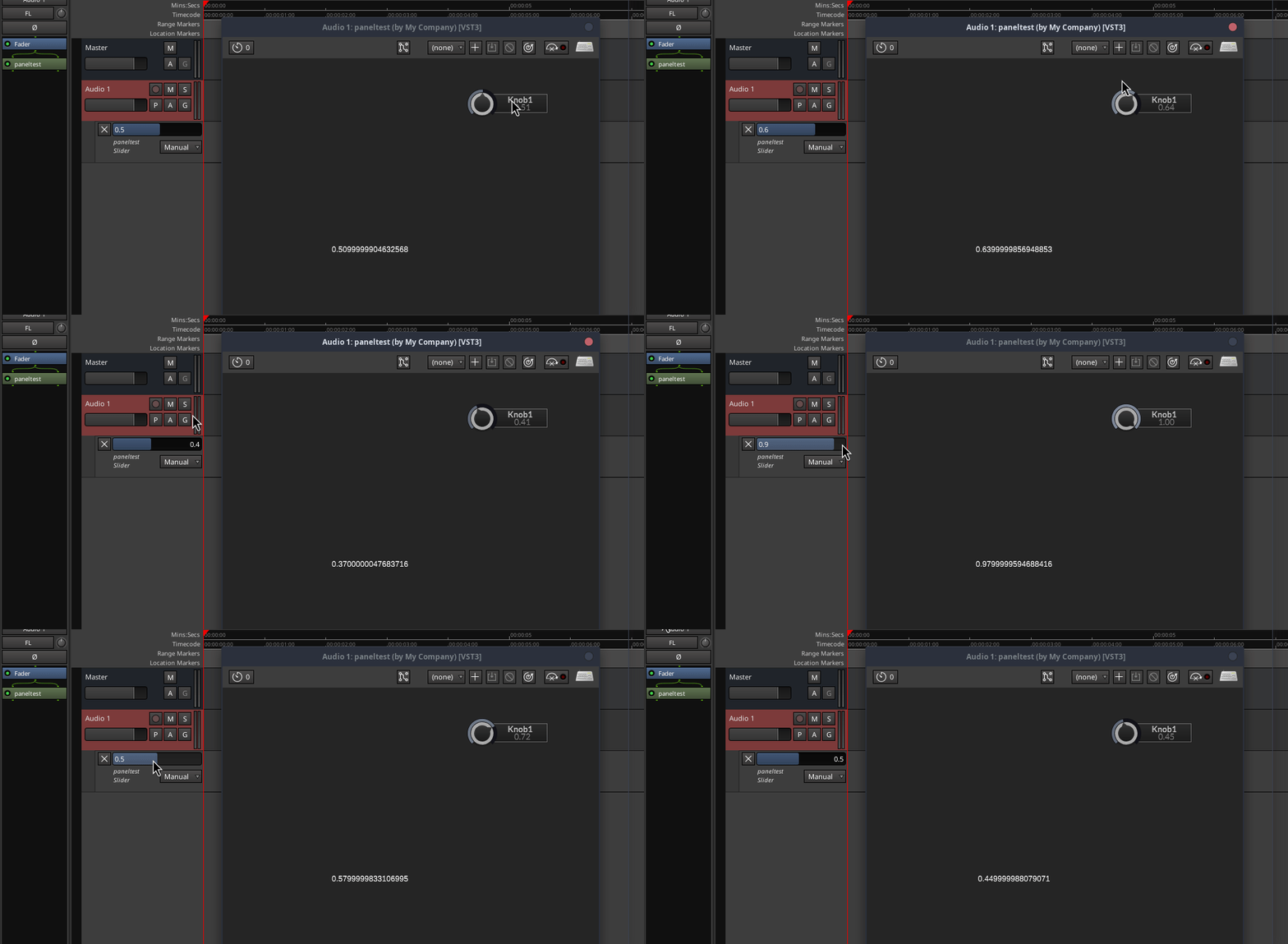
Here's my test snippet:
HiseSnippet 1005.3ocsV0sbaSDEdkSDjXnLzY3APMWovjIUN0IzLc5D23jT7zlTANjg6ZWKcr0NY8tZjV0DWFlgK3AgGEd.3kf2.tgqgytqjkLIgx3gpKRz4+uyuxgYxHHOWlQbZe9rTf37otCmITI8SnLAYvQDmOwMkJ.94Pthb3rTZdNDSbbV44ZEbVeUh44ON3PJmJhfZVDxERVD7R1TlplaZuWv37Snwv4roMztauAQRQeIWVffYE2.RJM5R5D3LpVsVtjullmPb9R2Nc6DGr6tifc1ebvdPviBniC5tCc+Q6G2cWXeHH9w6.QADmO53XlRlMTQUPNwY0CkwyFlHuRXCvErb1HNnI5PFhQ1x9DIOVmhZtj9ILdbXUUJmfdIrtlshsl8EtmxhYy4WW69bi.uZKZV.cZsH7VYA30oI7BZ.uaARNMfzpVHce2gQYrTUsDaubfPAYioXepITr5RZE1xsuD0Pn1dJ8R3jLjXtE96EDrkG9mMeR61O7gOvKTOWzoM11xUkDdO0qxAS.Ue4zTo.I72vJdCso1W2NGTgXcR8sxBES.9iKDQJlT3OYy1+P60mnUvNN3a+W91WkvT.5BTXbF8pmwYSDP74v0JeUBKWGxKn7Bveys7pX7RYDkenrPDm6Gf72HBwSFDqgxOpgiIUdgPNpJSLuemIhQp1XyKVPhNTx6S47Q3HquTXDUxVGBlfiYnWUF5snF9QUdeKu2pguI+qqR1TxJ4IyEjAo5pmuNMZ2vymIUvqD9FefR79mhFO9VkUhENjcqh06pY+aF5KJlNBxZlAZEw4wEGxcu6g7l6fQ1ZeCEkhABl5Uof3t1LIkML8BQIpPUUl0gOqbcXHmECYDFN0+wtll.w.3x6P+5e5+aGP9tAGQUzJ2fdDiRJjoX5Dv4H3s3UM6V15tGA4Wpjo3Ap4yHnqsA8dU6f5NlIlq4Z6djqme36m9ldypIF26JVrJYNieQ0KAXSRpOf1S1ikGxKlvDgzL71HtchkUGGhoBLGCq8dS7ZL7lqahgm2aJKNlCgxbltI27hdtBRGxdWU8p2u+te9fzEAi8d8ZtUQ7lf0z9t4IK7XoLtfSUKdAU+clRAZvz7rk9zj.A4rleG5+syp+Wg38cCYpnjaGistELhSVeHvX4Gitm6wiGCQpZ.tp6Ie+Glu7PrGumbJUkwv4I2yJlNDOUGAXzE3jtdi2okdxzRGno0UfgfH1P7W3SovNUywZgcpDRlRixjuNxtQq+b2ZFNHlDlQs0cOUS6s3pr4AGjYuNJZQWcCC2YYM7QKqgcWVC2cYMbuk0vuZYM7wueC0+3nmUnjSsqMDxogGaN853brfhSfloUxeisixeoFree HISE Bootcamp Full Course for beginners.
YouTube Channel - HISE tutorials
My Patreon - More HISE tutorials -
@David-Healey Thanks for testing. I think your working case is actually the same gesture thing seen from the other side.
In your example Knob1 is a real slider you drag directly, and it just mirrors its value into Panel1 for display. The knob is the parameter, and because it's a real slider being dragged, JUCE fires beginChangeGesture/endChangeGesture, so it reads back. The panel there is only a readout.
Mine is different: the panel is the thing being dragged. I need handle-only dragging (move only when you grab the handle, not when you click the groove), which a normal slider can't do, so the panel intercepts the mouse and pushes the value into the invisible slider with setValue/changed from script. The slider itself is never dragged, so no gesture fires, and Cubase records the lane but doesn't arm it for read until I reload the project.
So dragging a real slider directly works (your case), but I can't do that without losing handle-only, and driving the slider from script gives me handle-only but no gesture. As far as I can find there's no HISEScript API to emit beginChangeGesture/endChangeGesture.
So the real question: has anyone gotten host automation to read back on a script-driven control - one you set with setValue/changed rather than by dragging the actual slider - without a project reload?
https://instagram.com/morphoice - 80s inspired Synthwave Music, Arcade & Gameboy homebrew!
-
@Morphoice I was demonstrating the host automaton on the slider (invisible in your case) updates the panel
Free HISE Bootcamp Full Course for beginners.
YouTube Channel - HISE tutorials
My Patreon - More HISE tutorials -
@David-Healey said in Custom controls:
I was demonstrating the host automaton on the slider (invisible in your case) updates the panel
Right, but in your demo you're dragging the knob. We're not - we drag a view (panel) that sets the knob's value from script. A real drag fires beginChangeGesture/endChangeGesture, which is what arms the parameter for read; a script setValue/changed doesn't. So the host writes our automation but won't read it back until reload. The knob itself automating fine was never the issue - it's that our value comes from script, not a drag, and there's no script API to emit the gesture.
https://instagram.com/morphoice - 80s inspired Synthwave Music, Arcade & Gameboy homebrew!
-
@Morphoice said in Custom controls:
We're not - we drag a view (panel) that sets the knob's value from script.
I get it, from the automations point of view you need it to work both ways - changing the knob sets the panel's value and triggers the paint routine, dragging the panel changes the knob's value.
@Morphoice said in Custom controls:
there's no script API to emit the gesture.
In the knob's callback you put
panel.setValue(value); panel.repaint();Free HISE Bootcamp Full Course for beginners.
YouTube Channel - HISE tutorials
My Patreon - More HISE tutorials -
@David-Healey Yep, that's exactly what I have. The invisible knob is the parameter and its control callback does panel.setValue(value); panel.repaint();. That half works - if the knob receives a value, the panel follows it.
The gap is on the write side, not the read side. I never drag the knob - I drag the panel, because I need handle-only dragging (move only when you grab the handle, not when you click the groove), which a normal slider can't do. So the panel intercepts the mouse and sets the knob's value from script. A real drag fires beginChangeGesture/endChangeGesture, and that's what tells the host to arm the parameter for automation read. A scripted setValue/changed doesn't fire it, so the host records my lane but never arms it - on playback it never sends the value back to the knob, the callback never runs, the panel never moves. A project reload fixes it because the host re-reads the parameter list.
So the knob->panel read path you're showing is already in place and fine. The only missing piece is that my value change comes from script rather than a drag, and there's no HISEScript API to emit the gesture.
https://instagram.com/morphoice - 80s inspired Synthwave Music, Arcade & Gameboy homebrew!
-
Free HISE Bootcamp Full Course for beginners.
YouTube Channel - HISE tutorials
My Patreon - More HISE tutorials -
@David-Healey said in Custom controls:
Oh I missed that, I'll check
I wonder if my best option is to simply modify HISE to give the slider a thumb-only mode (gate that Slider::mouseDown call in HiSlider on getPositionOfValue) and throw the stack away
https://instagram.com/morphoice - 80s inspired Synthwave Music, Arcade & Gameboy homebrew!
-
@Morphoice Two way link is working here
HiseSnippet 1113.3ocsV8taiTCD2aaWnIvg3j3AXuJPZCTkaSu1xUcBQtl1dTcWaCjREe6vw1IqUcrWsq21FPmDOJ7Md83M.Faua1MsoEHhKeHIy++4YFOi6mpHrrLUJxq44SSXHuO1evToNtWLlKQGe.x6i7SvRl3bVlFs+zDbVFih77V8UFE7ZrFx94O+18wBrjvpXgPWn3D1a3S35JtIceMWHNBSYmymTS6s6dLQI6oDpb.Lq5GgRvjKwiYmhMpshO56vYwHuuzuy1cnQ6ryP1V6MJZWVzyhvih1dK7dC2it8Nr8XQzmuEiDg79fCobsJcfFqYYHu01WQmNHVcszEfK3Y7gBlgnCZ.DYG6iTBp4HZ3h5EyEz9kYoLD3k9U4rUc4rOy+DNkOieUt6SsBBprndBzak4g2pyAuN0gWTM3s.H4UCRq4fzi8GPR4I5JItZ4wRMKcDFpS0ghSWzJ+wp98TfFRc6I3KYGkBDyrHb2nnMCfuZ8hlMe5SeRPeSeQmlPYKSWPD7MAkNXLS2SMIQIAhvMbh2vX5+Q8c+qclQrTmpD8vBwPn2HTIcxJ3a7MWJ3RVvnbIQyUxfaoRHoLBaFbEVjyZ07Wa130R0Pa.tvvJzI3Ek7IwX4XFMD37tl0PSenHq+AUtFBXXY.CGa83XGbM8xgtexZecLWac631zT70uTvGKYzyY2nC0w7Ly42E+VaFTx3MJBVruJWRyBi.9aP.nmxnl7x6Lm2J3bhJOiMK0LCOrq.KrXhOJH7IVx1DAmbIi1pYiFoLcdpDPUilMtBmFbETQtMdB9pfNsB9hfNQPDaXEVkrLmHKq54oxNDaFrnfa++8VusRMGqYEi6VsshdvhccMVbstJgcqhcgfTVhot5p1077oJM6LYn0GfjfaKZznEJq.KBV5BEaFAl9PFFJymLjkV+DXTDtlO+rC+6e1Q8QaDWtulhJ4wRt9rDl79F3gJJXl4LEnBTUamx7IESYFH3TVJhCCS9PeaQ.YAb8kAne73CvZboa.OBQIgkp4lCf2ArqfkEtgWM7OfkcoVk.y8m0i.rcA8Qki1LULaLW22U8P2LKf+122cZEwntWyo53YL9cc2XFebb0dotpt7r9h7wbXhQJrxAF54xHP+m55xtvLS36Yt9jEblTLEMAWESzm2EcW39.4nJS+4apC2W0cBmREr9pLtoendZLSyRFv+Evw99Qs6fRlGytskq6WFsEeltMpu69CXykhlKv54WmYV5WHvfq56PL6Ij.dmV+QA+usi6eKDereetlDuXLtxBvHzO99.iEuL3Q9GNZDinq.3Z9G8SuedF.xsLZ7IXcJGpu9mlOY.r5gvfnKg6Gl4DdqXtQ6niLzlLv.ljZI9K3SgvNFZuBgcJEBcNjT0aIt4.l2drtkCfIosyqg+IF5fEL..5o4ukPl2U2wvsVVCe1xZ31Kqg6rrFt6xZ3WurF97+YCMuT8k4Z0D20FD5j9GZGX64cnDCcf1tUzeyxYUW1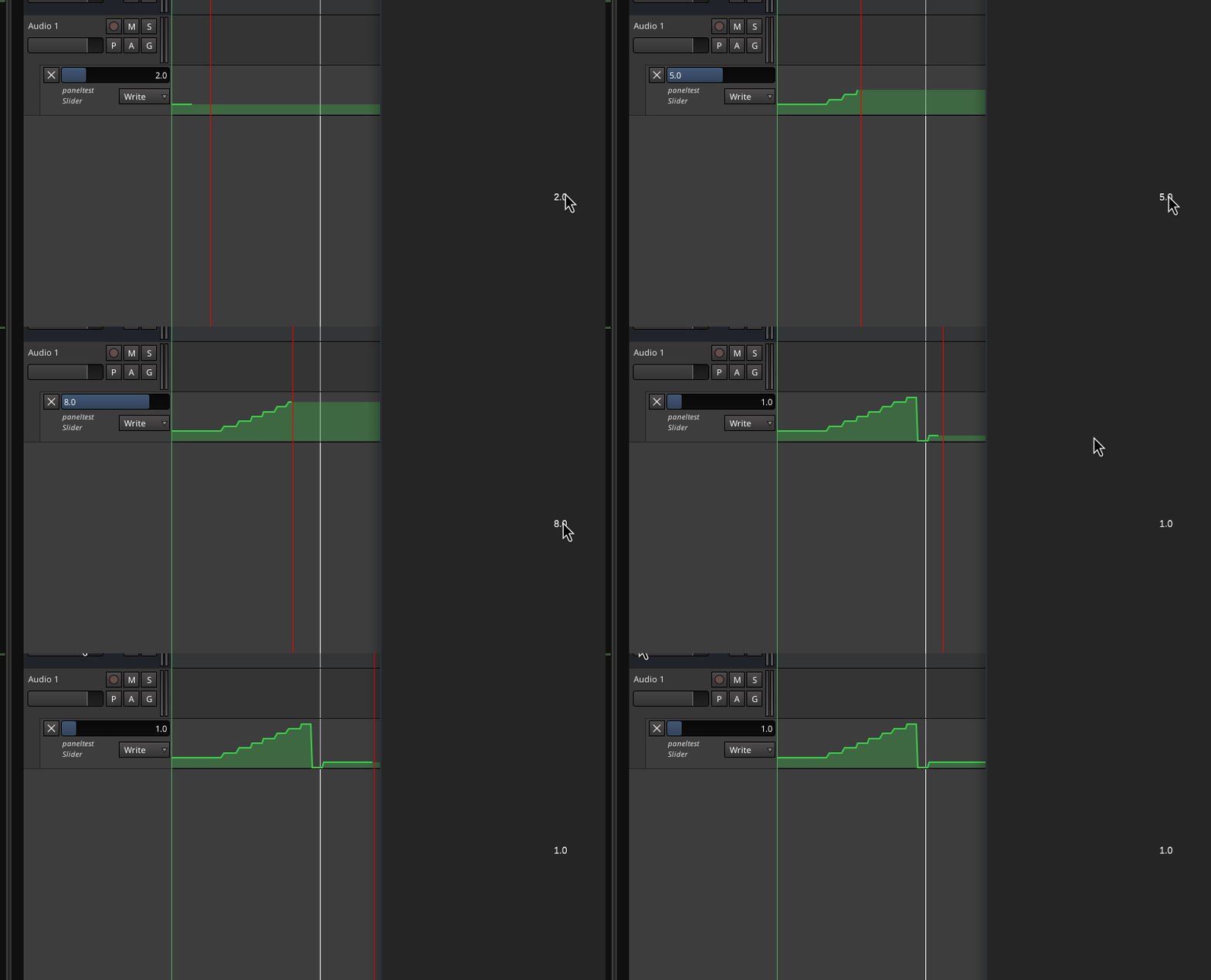
Free HISE Bootcamp Full Course for beginners.
YouTube Channel - HISE tutorials
My Patreon - More HISE tutorials -
@David-Healey using the knob's control callback for the read side is cleaner than the poll I was using, so thanks for that. But I think the reason it works for you and not me is the host. Nothing here emits beginChangeGesture/endChangeGesture - Knob1.changed() from script doesn't - and Cubase only arms a parameter for automation read once it has seen that gesture. Your host seems to arm on a plain edit, so the round-trip fires; in Cubase the lane is written but never armed, so the read is never sent back and onKnob1Control never runs (until a project reload). So I think your test actually pins it on Cubase's gesture requirement rather than the link logic.
https://instagram.com/morphoice - 80s inspired Synthwave Music, Arcade & Gameboy homebrew!
-
@Morphoice Did you test my snippet?
Free HISE Bootcamp Full Course for beginners.
YouTube Channel - HISE tutorials
My Patreon - More HISE tutorials -
@David-Healey at it. If this works in Cubase I'm gonna cry
-
@David-Healey Confirmed in your own snippet: if I write the automation by moving the knob from script (panel -> Knob1.setValue/changed) instead of dragging it, Cubase records the lane but won't read it back on playback until I reload the project.
https://instagram.com/morphoice - 80s inspired Synthwave Music, Arcade & Gameboy homebrew!
-
@Morphoice Which OS? I'm going to try this
Free HISE Bootcamp Full Course for beginners.
YouTube Channel - HISE tutorials
My Patreon - More HISE tutorials -
@David-Healey I'm on MAC
https://instagram.com/morphoice - 80s inspired Synthwave Music, Arcade & Gameboy homebrew!
-
@Morphoice I'm not sure why, because I don't really know Cubase, but the panel is able to read/write automation in my test, even though I didn't set it as a plugin parameter in my snippet.
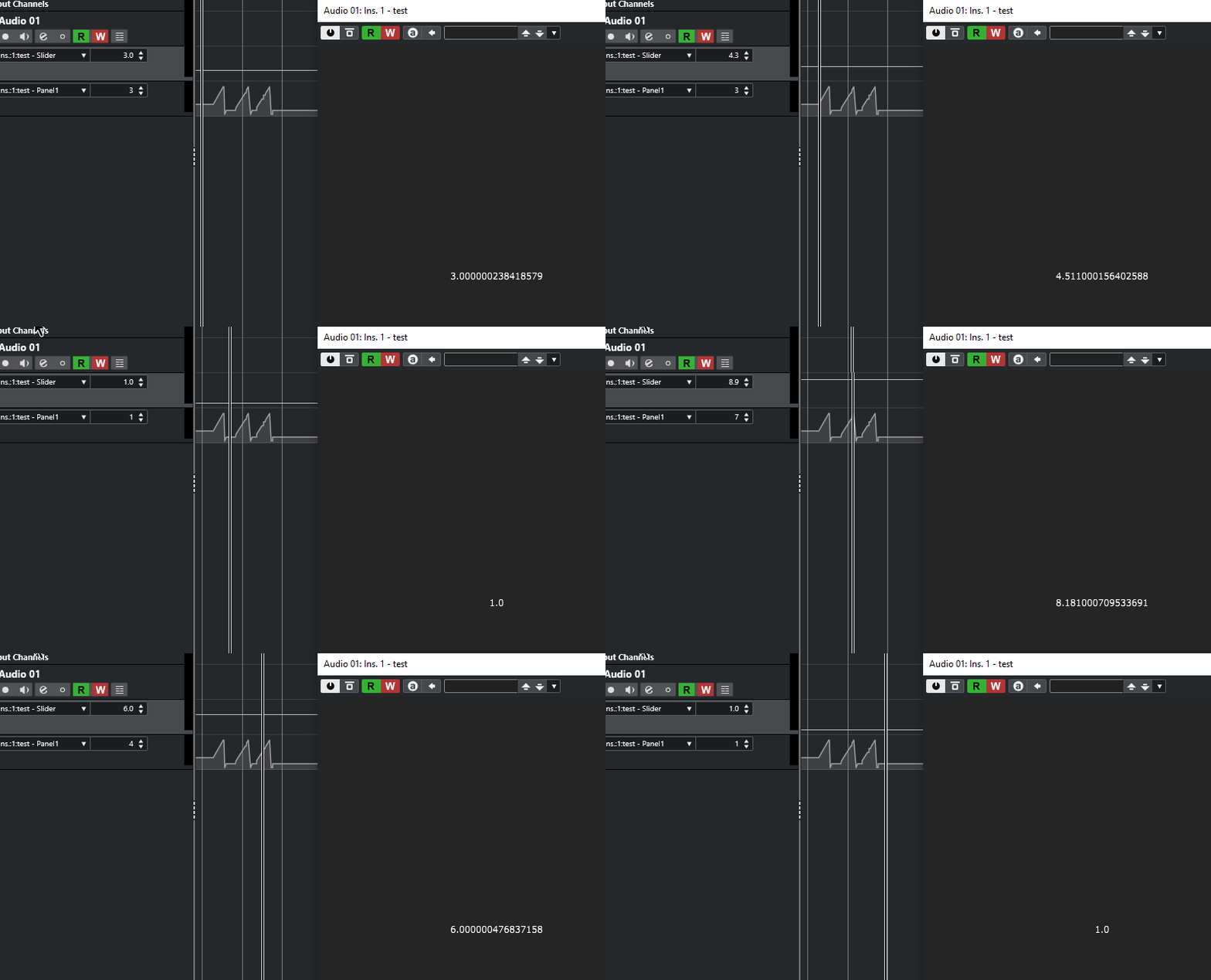
Edit: Aha, in the xml I see this
  <Component type="ScriptPanel" id="Panel1" x="70" y="180" width="330" height="250"
             isPluginParameter="1" allowCallbacks="Clicks Only" max="10.0"
Free HISE Bootcamp Full Course for beginners.
YouTube Channel - HISE tutorials
My Patreon - More HISE tutorials -
@David-Healey I rewired a test slider in my plugin as a panel-as-parameter exactly like you did in your example, no change in Cubase. I'm attempting to patch HISE to have that handle click gated
-
@David-Healey I added a dragThumbOnly property to Scriptslider
if enabled:
- A left-click on the slider track no longer starts a drag or jumps the value.
HiSlider::mouseDown hit-tests the click against the drawn handle centre
and only forwards to Slider::mouseDown when the click lands on the
thumb (within dragThumbSize/2 + dragThumbPad). Right-clicks still pass
through for MIDI-learn / context menu. - Snap-to-mouse is disabled, so dragging the thumb is relative and the
value does not snap to the cursor on click.
if anyone is interested it's on my fork
https://github.com/morphoice/HISE/commit/7b206d1951558381a2a38b2691a504d7542eec56however the dimensions are currently hardcoded to my needs, so there will be further changes needed to make this a general feature. I therefor didn't make a PR
- A left-click on the slider track no longer starts a drag or jumps the value.