Development Diary: My First Sample-Based Piano
-
Hi everyone!
I’ve been silently reading and learning a lot from this amazing community for a while. Now, I’ve finally gathered the courage to start my first serious commercial project: Petrof Piano (I haven't come up with a name yet :/).
I wanted to share my development journey with you all, rather than just waiting until the finish line.
Instead of going the physical modeling route, I am building a heavily sample based, grand piano based on a Petrof. For close mic recording, I use 2X Neumann KM184 Cardioid Condenser. For preamp I use SSL AWS 900+
Current Progress:
- Main Audio Engine: Ready and fully functional.
- Close Microphone: Fully mapped and completed with 6 Velocity Layers (from delicate pp to aggressive ff) to capture the true dynamic range and timbre shift of the wood. (Room and Far mics are in the works).
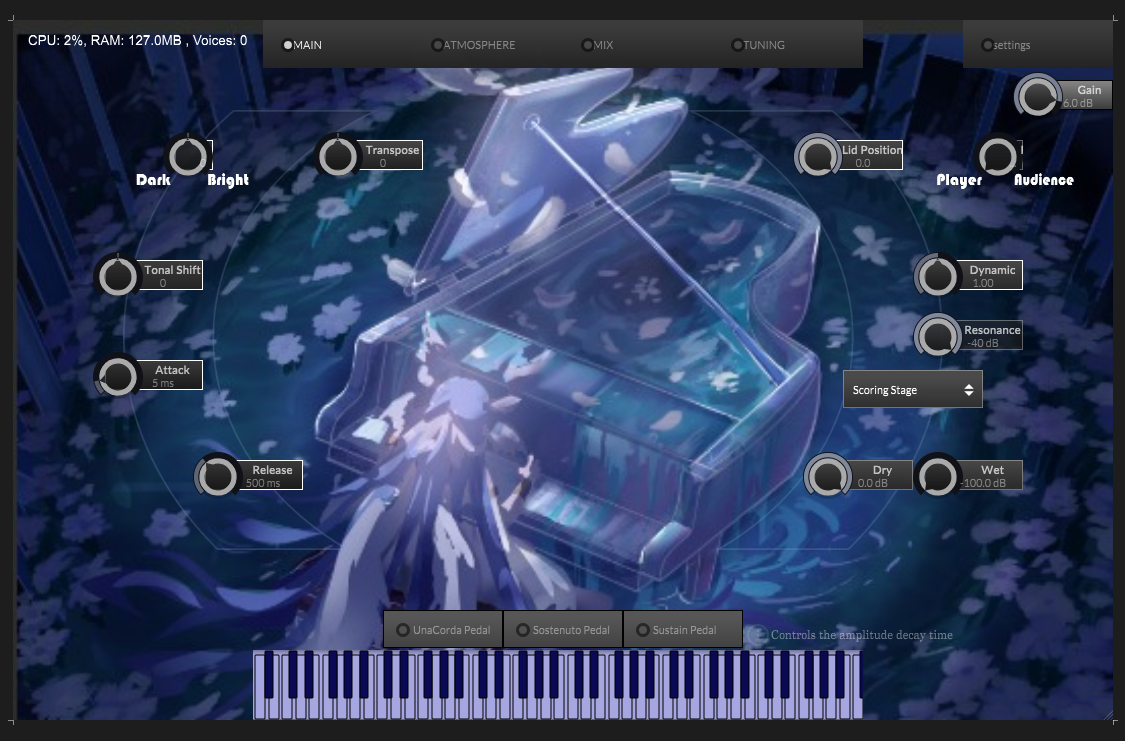
Systems Already Implemented (as seen in the WIP GUI):
- Tone Shaping (Dark/Bright & Tonal Shift)
- Perspective & Space (Lid Position & Player/Audience controls)
- Envelope & Dynamics (Attack, Release, Dynamic response)
- Resonance Engine
- Dedicated Reverb Module (Scoring Stage, etc. with Dry/Wet)
- Pitch Control (Transpose)
- Full Pedal Support (UnaCorda, Sostenuto, Sustain)
-Chord analyzer (extra)
What's Next:
The only major thing left to implement is the Mechanical Sounds layer (key release, pedal action, wood creaks) to make the instrument feel 100% organic.
If you'd like to hear how it sounds, I'm leaving an unlisted YouTube link below. It's just a quick
https://youtu.be/VHhs1g4CwcsSince this is my first time handling such a massive sample pool (6 velocity layers across 88 keys with 3 mics + upcoming mechanical layers), I have a question for the veterans here:
Do you have any golden rules or specific settings in HISE for RAM optimization and voice management when dealing with very large, multi-mic sample maps? I want to make sure my foundation is absolutely bulletproof before I map the remaining microphones.
I will keep updating this thread as the beast comes alive. Cheers!
-
Congratulations, looks like a very in depth project, I bet you're having equal parts fun and losing your hair

@omerdal said in Development Diary: My First Sample-Based Piano:
Room and Far mics are in the works
You didn't record/edit them alongside the close mics? Or you just haven't included them in the mapping?
-
@David-Healey Thank you so much, Haha, exactly. Definitely losing some hair over here

Regarding the mics, they were recorded at the exact same time (I wouldn't risk phase issues). It’s just that manually editing, denoising and mapping thousands of individual notes takes forever... maybe months and months... :(
I just wanted to map the Close mic first to ensure the core engine and UI are working perfectly before I dive into slicing the rest of the audio files.
-
@omerdal said in Development Diary: My First Sample-Based Piano:
It’s just that manually editing
You can probably automate a lot of the process. I've not sampled a piano before though so maybe there's more manual work required there.
Have you worked with HISE's multi-mic feature before?
-
@David-Healey exactly. Babysitting those delicate pp decays and transients takes forever... I actually watched your all videos in bootcamp and tried to apply those techniques here but the sheer volume of 88 keys makes it a different beast.
To be honest, I haven’t tried the multi-mic feature yet. My current plan was just opening separate Sampler modules for Room and Far mics which is exactly why I was so worried about the RAM and voice count!.

If HISE can handle all 3 mics inside a single Sampler, that would be a total lifesaver. Do I need to combine my mics into multi-channel files in my DAW first or can HISE link the separate stereo files internally?
-
@omerdal Single sampler is the way to go. You load all the samples and HISE can merge them into a single virtual sample. From then on you only have to deal with it as if it's a single sample, if you move the start/end time, adjust the pitch/volume/pan etc. it will apply to all mics. But you are still able to purge individual channels and route the mics separately.
I have a few videos on YouTube (and possibly Patreon) showing how to work with multi-mics.
-
@David-Healey I was really over complicating it in my head by trying to manage separate sampler modules
 I’m heading over to your channel right now to find those multi-mic tutorials. Thanks a ton for pointing me in the right direction.
 -
@omerdal You might also find this video on sample editing useful. My workflow is constantly evolving and it's now a little different from what I show in the video.
-
@David-Healey Thanks for the video, checking it out today. It’s actually a huge relief to hear that even you are still tweaking your workflow after all this time. Gives me hope that I won’t be stuck in this mapping hell forever.
Even if your process has changed since then, I’m sure there are some solid tricks in there for me. Thank you so much :) -
@omerdal Every time I edit a library I end up refining the process or trying different tools/methods.
-
@omerdal this looks DOPE. congrats and i wish you success
-
@David-Healey Thanks again for all the guidance and the resources.
-
@l8prod Thanks a lot. Really appreciate the support. Hearing this keeps the motivation high :)
-
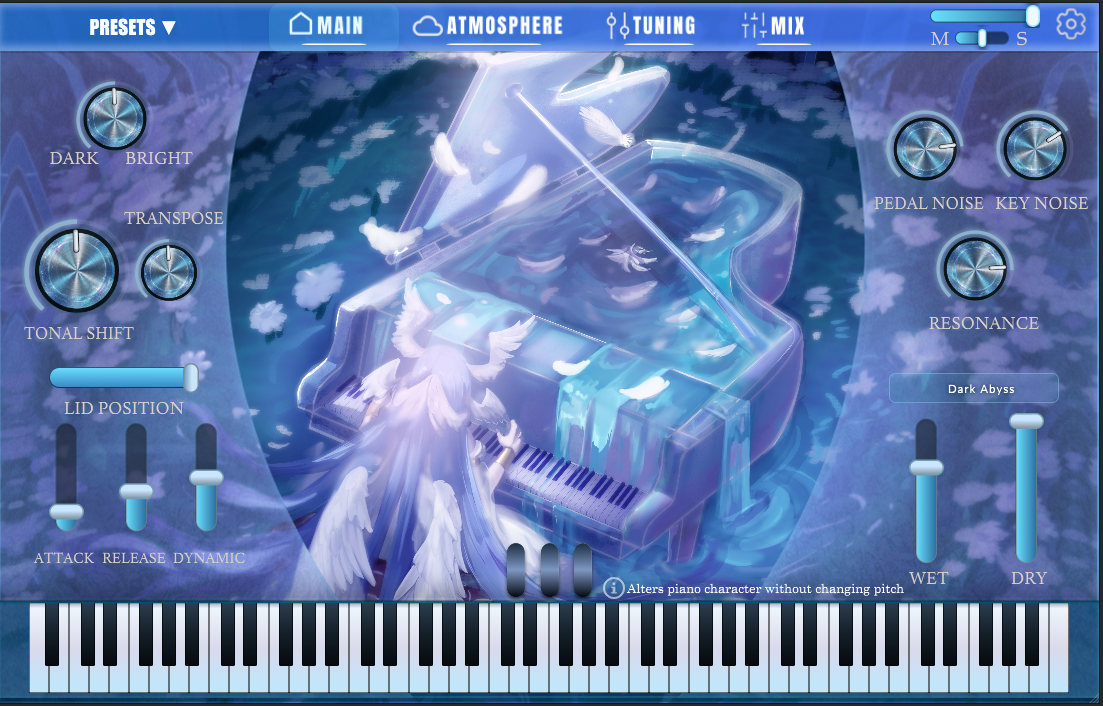
I've finally finished the UI design for the VST.
Instead of going with a traditional interface, I decided to aim for a highly stylized fantasy aesthetic.
The layout is mostly set, featuring the Main, Atmosphere, Tuning and Mix tabs at the top. I've tried to keep the essential performance controls (like Tonal Shift, Lid Position and mechanical noises) easily accessible without cluttering the artwork.
Would love to hear your thoughts on the design and layout.
