Development Diary: My First Sample-Based Piano
-
@David-Healey exactly. Babysitting those delicate pp decays and transients takes forever... I actually watched your all videos in bootcamp and tried to apply those techniques here but the sheer volume of 88 keys makes it a different beast.
To be honest, I haven’t tried the multi-mic feature yet. My current plan was just opening separate Sampler modules for Room and Far mics which is exactly why I was so worried about the RAM and voice count!.

If HISE can handle all 3 mics inside a single Sampler, that would be a total lifesaver. Do I need to combine my mics into multi-channel files in my DAW first or can HISE link the separate stereo files internally?
-
@omerdal Single sampler is the way to go. You load all the samples and HISE can merge them into a single virtual sample. From then on you only have to deal with it as if it's a single sample, if you move the start/end time, adjust the pitch/volume/pan etc. it will apply to all mics. But you are still able to purge individual channels and route the mics separately.
I have a few videos on YouTube (and possibly Patreon) showing how to work with multi-mics.
-
@David-Healey I was really over complicating it in my head by trying to manage separate sampler modules
 I’m heading over to your channel right now to find those multi-mic tutorials. Thanks a ton for pointing me in the right direction.
 -
@omerdal You might also find this video on sample editing useful. My workflow is constantly evolving and it's now a little different from what I show in the video.
-
@David-Healey Thanks for the video, checking it out today. It’s actually a huge relief to hear that even you are still tweaking your workflow after all this time. Gives me hope that I won’t be stuck in this mapping hell forever.
Even if your process has changed since then, I’m sure there are some solid tricks in there for me. Thank you so much :) -
@omerdal Every time I edit a library I end up refining the process or trying different tools/methods.
-
@omerdal this looks DOPE. congrats and i wish you success
-
@David-Healey Thanks again for all the guidance and the resources.
-
@l8prod Thanks a lot. Really appreciate the support. Hearing this keeps the motivation high :)
-
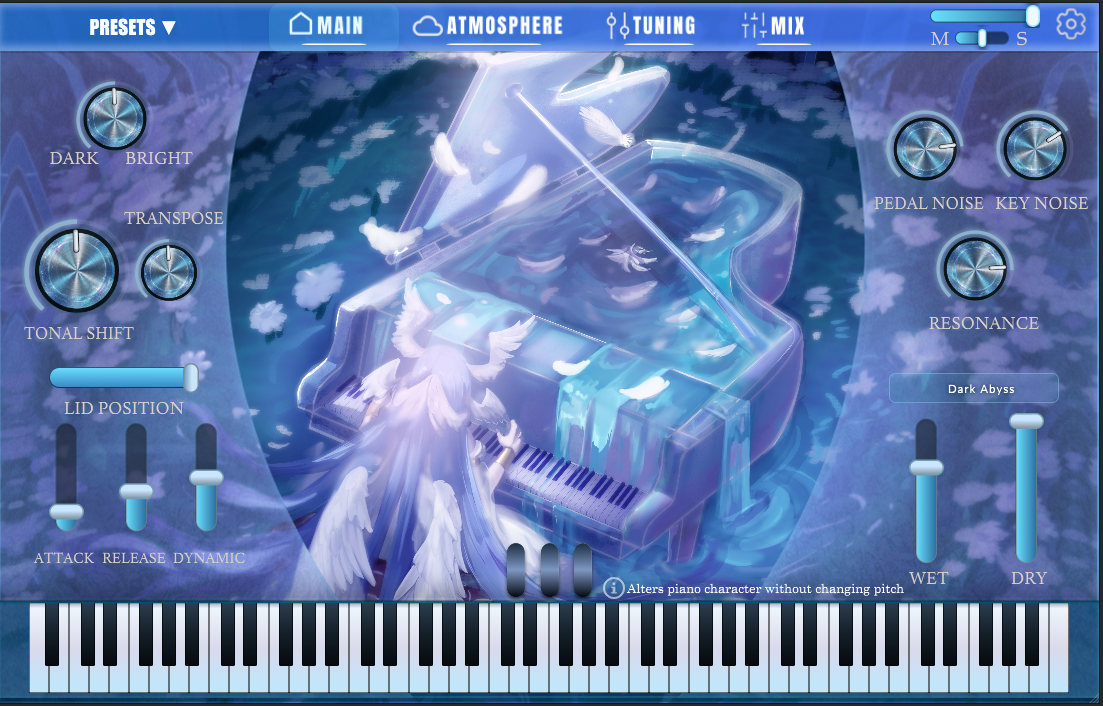
I've finally finished the UI design for the VST.
Instead of going with a traditional interface, I decided to aim for a highly stylized fantasy aesthetic.
The layout is mostly set, featuring the Main, Atmosphere, Tuning and Mix tabs at the top. I've tried to keep the essential performance controls (like Tonal Shift, Lid Position and mechanical noises) easily accessible without cluttering the artwork.
Would love to hear your thoughts on the design and layout.
