Command CodeSign failed with nonzero exit code
-
@David-Healey It came up with an error :
HISE % git checkout 3957028845b3da93620aa781857dcbf8e9c294a5
error: The following untracked working tree files would be overwritten by checkout:
tools/api generator/ApiExtractor.exe
tools/api generator/BinaryBuilder.exe
tools/api generator/batchCreate.bat
tools/api generator/xml.doxyfile
Please move or remove them before you switch branches.
Aborting -
@Jimi_Jay Delete the files it mentioned. Then run the git checkout command again.
-
@David-Healey I think this means the command worked but I'll still send it here just in case :
HISE % git checkout 3957028845b3da93620aa781857dcbf8e9c294a5
warning: unable to rmdir 'tools/api generator': Directory not empty
warning: unable to rmdir 'tools/hise_lsp_server': Directory not empty
M JUCE
M tools/mcp_server
Note: switching to '3957028845b3da93620aa781857dcbf8e9c294a5'.You are in 'detached HEAD' state. You can look around, make experimental
changes and commit them, and you can discard any commits you make in this
state without impacting any branches by switching back to a branch.If you want to create a new branch to retain commits you create, you may
do so (now or later) by using -c with the switch command. Example:git switch -c
Or undo this operation with:
git switch -
Turn off this advice by setting config variable advice.detachedHead to false
HEAD is now at 395702884 Merge branch 'develop' of https://github.com/christophhart/HISE into develop
-
@David-Healey I cleaned the build folder on xcode and tried again and this time I got a different error :
Showing All Errors Only
Build target HISE Standalone - App of project HISE Standalone with configuration Debug
CompileC /Users/jay/Library/Developer/Xcode/DerivedData/HISE_Standalone-cnktsjmvoartasbasfwshrpxxybp/Build/Intermediates.noindex/HISE\ Standalone.build/Debug/HISE\ Standalone\ -\ App.build/Objects-normal/arm64/include_hi_backend_02.o /Users/jay/Documents/HISE/projects/standalone/JuceLibraryCode/include_hi_backend_02.cpp normal arm64 c++ com.apple.compilers.llvm.clang.1_0.compiler (in target 'HISE Standalone - App' from project 'HISE Standalone')
cd /Users/jay/Documents/HISE/projects/standalone/Builds/MacOSXUsing response file: /Users/jay/Library/Developer/Xcode/DerivedData/HISE_Standalone-cnktsjmvoartasbasfwshrpxxybp/Build/Intermediates.noindex/HISE Standalone.build/Debug/HISE Standalone - App.build/Objects-normal/arm64/82b82416624d2658e5098eb0a28c15c5-common-args.resp /Applications/Xcode.app/Contents/Developer/Toolchains/XcodeDefault.xctoolchain/usr/bin/clang -x c++ -ivfsstatcache /Users/jay/Library/Developer/Xcode/DerivedData/SDKStatCaches.noindex/macosx26.2-25C58-00fa09913b459cbbc988d1f6730289ae.sdkstatcache -fmessage-length\=0 -fdiagnostics-show-note-include-stack -fmacro-backtrace-limit\=0 -fno-color-diagnostics -Wno-trigraphs -Wno-missing-field-initializers -Wno-missing-prototypes -Wunreachable-code -Wnon-virtual-dtor -Wno-overloaded-virtual -Wno-exit-time-destructors -Wno-missing-braces -Wparentheses -Wswitch -Wunused-function -Wno-unused-label -Wno-unused-parameter -Wunused-variable -Wunused-value -Wempty-body -Wuninitialized -Wno-unknown-pragmas -Wno-shadow -Wno-four-char-constants -Wno-conversion -Wconstant-conversion -Wint-conversion -Wbool-conversion -Wenum-conversion -Wno-float-conversion -Wnon-literal-null-conversion -Wobjc-literal-conversion -Wshorten-64-to-32 -Wno-newline-eof -Wno-c++11-extensions -Wno-implicit-fallthrough -fstrict-aliasing -Wdeprecated-declarations -Winvalid-offsetof -Wno-sign-conversion -Winfinite-recursion -Wmove -Wcomma -Wblock-capture-autoreleasing -Wstrict-prototypes -Wrange-loop-analysis -Wno-semicolon-before-method-body -index-store-path /Users/jay/Library/Developer/Xcode/DerivedData/HISE_Standalone-cnktsjmvoartasbasfwshrpxxybp/Index.noindex/DataStore -Wreorder -Wno-reorder -Wno-inconsistent-missing-override -Wno-switch @/Users/jay/Library/Developer/Xcode/DerivedData/HISE_Standalone-cnktsjmvoartasbasfwshrpxxybp/Build/Intermediates.noindex/HISE\ Standalone.build/Debug/HISE\ Standalone\ -\ App.build/Objects-normal/arm64/82b82416624d2658e5098eb0a28c15c5-common-args.resp -MMD -MT dependencies -MF /Users/jay/Library/Developer/Xcode/DerivedData/HISE_Standalone-cnktsjmvoartasbasfwshrpxxybp/Build/Intermediates.noindex/HISE\ Standalone.build/Debug/HISE\ Standalone\ -\ App.build/Objects-normal/arm64/include_hi_backend_02.d --serialize-diagnostics /Users/jay/Library/Developer/Xcode/DerivedData/HISE_Standalone-cnktsjmvoartasbasfwshrpxxybp/Build/Intermediates.noindex/HISE\ Standalone.build/Debug/HISE\ Standalone\ -\ App.build/Objects-normal/arm64/include_hi_backend_02.dia -c /Users/jay/Documents/HISE/projects/standalone/JuceLibraryCode/include_hi_backend_02.cpp -o /Users/jay/Library/Developer/Xcode/DerivedData/HISE_Standalone-cnktsjmvoartasbasfwshrpxxybp/Build/Intermediates.noindex/HISE\ Standalone.build/Debug/HISE\ Standalone\ -\ App.build/Objects-normal/arm64/include_hi_backend_02.o -index-unit-output-path /HISE\ Standalone.build/Debug/HISE\ Standalone\ -\ App.build/Objects-normal/arm64/include_hi_backend_02.o/Users/jay/Documents/HISE/projects/standalone/JuceLibraryCode/include_hi_backend_02.cpp:9:10: fatal error: 'hi_backend/hi_backend_02.cpp' file not found
9 | #include <hi_backend/hi_backend_02.cpp>
| ^~~~~~~~~~~~~~~~~~~~~~~~~~~~~~
1 error generated./Users/jay/Documents/HISE/projects/standalone/JuceLibraryCode/include_hi_backend_02.cpp:9:10: 'hi_backend/hi_backend_02.cpp' file not found
Build failed 03/04/2026, 16:34 26.7 seconds
-
@Jimi_Jay Hmm at this stage I'd start trying different commits until I found one that builds. But that's not the easiest thing if you're not familiar working with git. It would be good if someone else chimed in with a working ARM macOS setup and could give some pointers.
You also might want to try the new setup tool: https://setup.hise.dev/
-
@David-Healey Does this setup tool work ? Because I already downloaded hise last year with a different macbook and not with git but it then wouldn't let me export the projects because it didn't find projucer even though I downloaded it to where they said it needed to be... I'll try anyway but yeah. It's weird that the versions of hise that are released on github don't work properly...
-
@Jimi_Jay I haven't tried it but other people have said it works. It basically gives you a script to run that does all of the steps you've been doing manually. It's unrelated to the prebuilt version of HISE you've downloaded in the past.
-
@David-Healey I followed all the instructions on the hise setup wizard and it failed aswell :
The following build commands failed:
CodeSign /Users/jay/Documents/HISE/projects/standalone/Builds/MacOSX/build/Release/HISE.app (in target 'HISE Standalone - App' from project 'HISE Standalone')
(1 failure)
[ERROR] HISE compilation failedThis is very frustrating that I can't seem to get anything to work properly...
-
@David-Healey Is there something I can do to prevent the signing of the app ? It seems to be the problem every way I try to download hise...
-
@Jimi_Jay Have you tried signing out of xcode?
-
@David-Healey I just tried and it didn't work either. I'll try again using git now that I've signed out but I don't think it will work as I think I hadn't signed in the first time I tried and it didn't work, I only signed in afterwards to see if that changed something.
-
@Jimi_Jay Have a poke around in xcode's settings and see if there is anything codesigning related stuff.
-
@David-Healey Tried it again without being signed in on xcode and it didn't work. Tried to find codesigning related settings and couldn't find anything... I really don't know what to do
-
@David-Healey Nevermind, I found the settings for codesigning and before you used to be able to select don't code sign in code signing identity but now you need to select other and then leave it blanc, it now seems to work! I'll watch the end of your video now to see how to install the release version, it might be mentionned in the video but do you delete the debug version once you have the release version ?
Thanks for your time and help anyway, I'm happy it ended up working! -
@Jimi_Jay said in Command CodeSign failed with nonzero exit code:
Nevermind, I found the settings for codesigning
Excellent, could you post a screen shot or instructions on how to find that setting, to help other people who may stumble across this thread in the future?
@Jimi_Jay said in Command CodeSign failed with nonzero exit code:
might be mentionned in the video but do you delete the debug version once you have the release version ?
Yes, cleaning the build folder removes the previous build.
-
@David-Healey Absolutely
Here's how I found the code singing setting :-
In xcode click onto the project (blue icon)
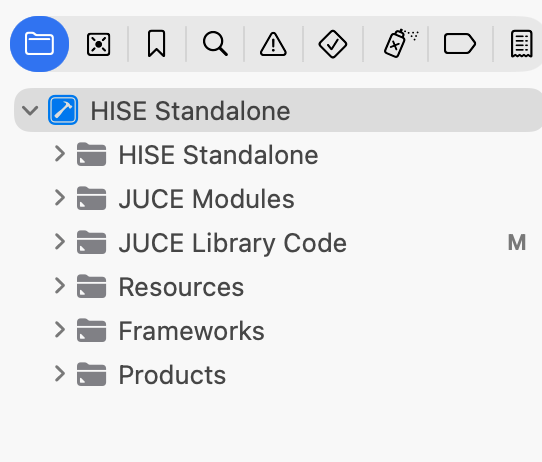
-
then go into Build Settings
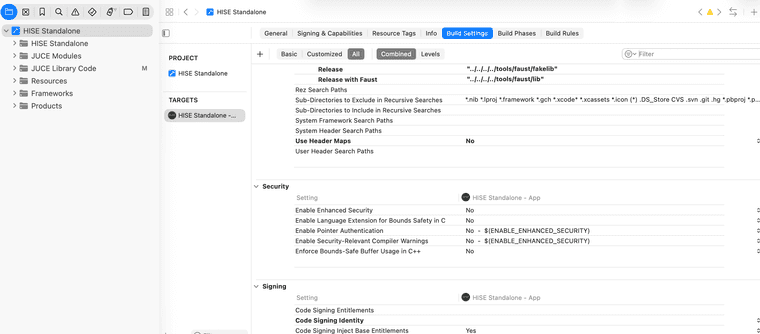
-
search for "code sign" in the search bar (top right)
-
click on the option for code signing identity
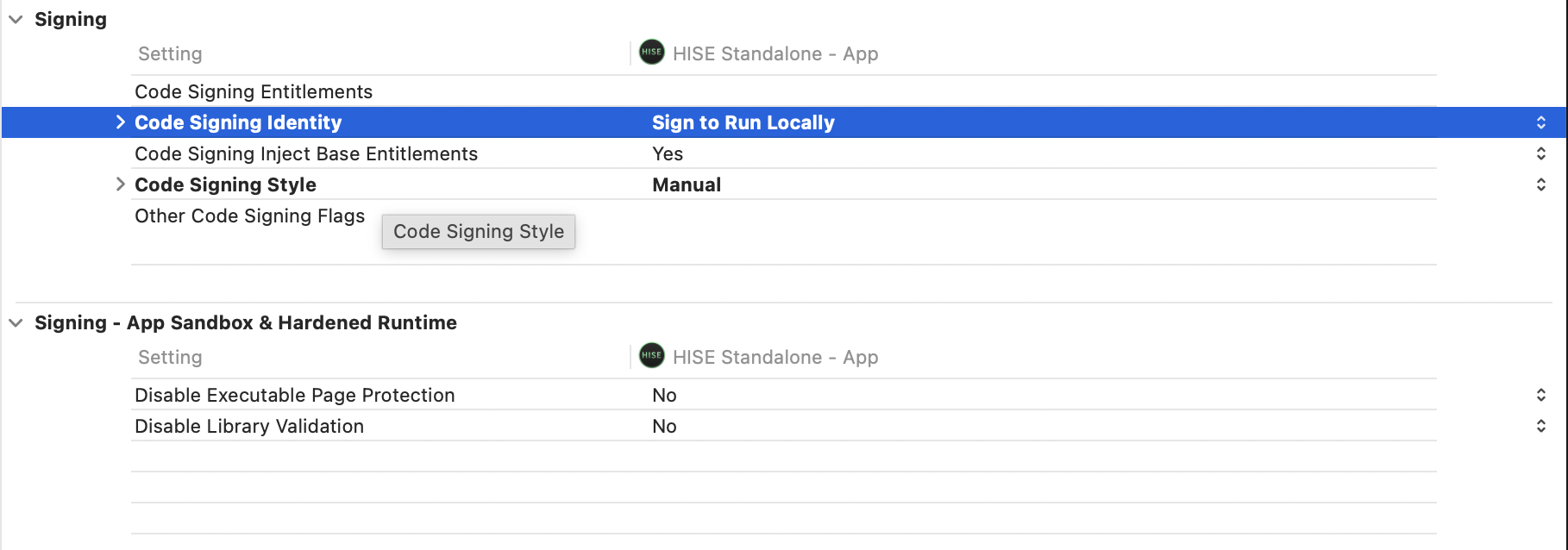
-select other
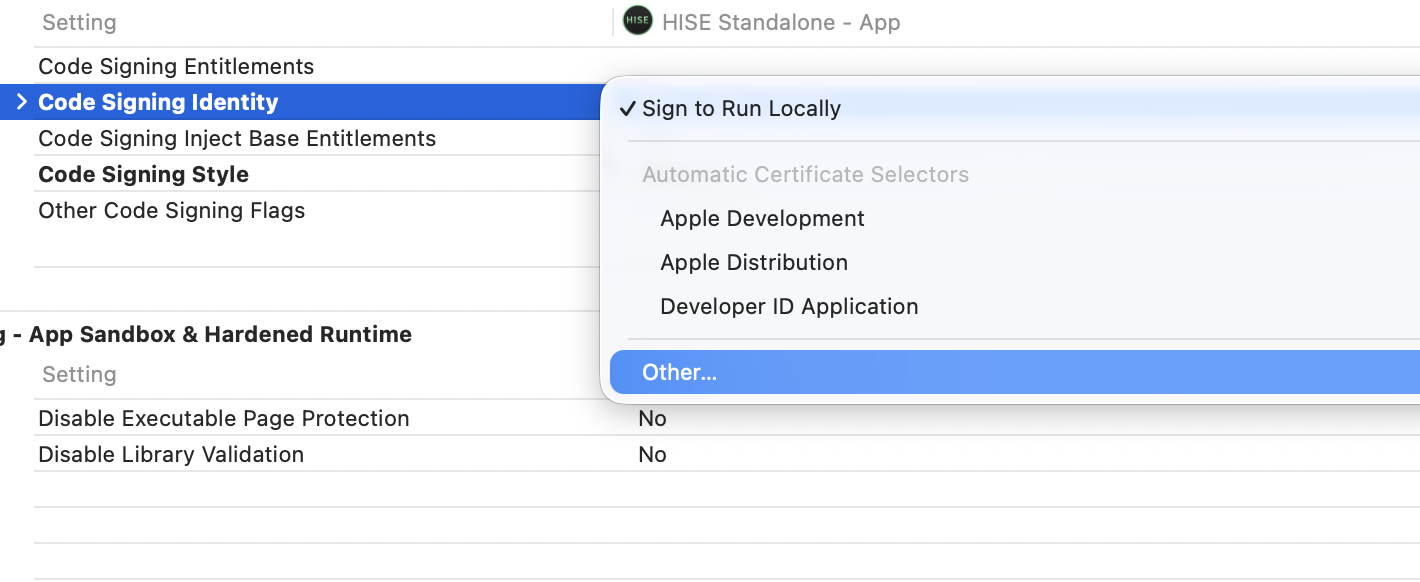
-
delete the dash and press enter
And that should do the trick !
-
-
 D David Healey referenced this topic on