Command CodeSign failed with nonzero exit code
-
@Jimi_Jay Could you tell me the exact steps you're taking to get to the point where you see the error? You don't need to be logged in to JUCE or xcode.
-
@David-Healey I followed every step but didn't download the same version of xcode as my os is more recent than the one in the video so I just downloaded the latest stable release from the website linked in the description. Then I went to build the standalone version. I dragged it onto the projucer window and clicked the don't ask again button on the 2 popups in projucer. Then I unchecked the auto check new versions option. This is where I couldn't follow the instructions, I don't have the sign in optioin under file in the projucer top menu, so I couldn't find the enable gpl mode button. Then I disabled the show juce splash screen option. I then selected the arm64 option as I have an apple M3 processor. I then opened it in xcode, clicked on edit scheme and selected debug, pressed play and it came up with the error I pasted previously. I'm thinking it might be linked to the gpl mode not being enabled but I don't know, just guessing... I'm really uneducated on this type of stuff, especially on macos, so any help is more than welcome!
-
@Jimi_Jay Try an older version of xcode
-
@David-Healey what version should I try ? the same one you used in your video ?
-
@Jimi_Jay said in Command CodeSign failed with nonzero exit code:
the same one you used in your video ?
If that version if available for your OS then yes. If not just go one version down from the one you've currently installed - things often break between versions.
-
@David-Healey Alright, I'll try that and let you know. Thanks
-
@David-Healey I tried downloading the version you used but it won't work because it is too old, so I tried the previous version to the one I was using and it doesn't work... I think in your video you said the gpl mode makes it so you don't need to sign in, I can't find the gpl mode option and I can't find the sign in option either... Could it be because of that ?
-
@Jimi_Jay said in Command CodeSign failed with nonzero exit code:
makes it so you don't need to sign in
That's the sign in within Projucer, it is unrelated to codesigning.
Do you see this in the top right corner of Projucer?

-
@David-Healey Yeah, I just saw this, gpl is enabled. I tried deleting the hise directory and its contents and deleting xcode and projucer and starting the process from 0 again but downloading the previous version of xcode and it came back with this error log :
Showing All Errors Only
Build target HISE Standalone - App of project HISE Standalone with configuration Debug
CodeSign /Users/jay/Documents/HISE/projects/standalone/Builds/MacOSX/build/Debug/HISE\ Debug.app (in target 'HISE Standalone - App' from project 'HISE Standalone')
cd /Users/jay/Documents/HISE/projects/standalone/Builds/MacOSXSigning Identity: "Sign to Run Locally" /usr/bin/codesign --force --sign - --entitlements /Users/jay/Library/Developer/Xcode/DerivedData/HISE_Standalone-cnktsjmvoartasbasfwshrpxxybp/Build/Intermediates.noindex/HISE\ Standalone.build/Debug/HISE\ Standalone\ -\ App.build/HISE\ Debug.app.xcent --timestamp\=none --generate-entitlement-der /Users/jay/Documents/HISE/projects/standalone/Builds/MacOSX/build/Debug/HISE\ Debug.app/Users/jay/Documents/HISE/projects/standalone/Builds/MacOSX/build/Debug/HISE Debug.app: resource fork, Finder information, or similar detritus not allowed
Command CodeSign failed with a nonzero exit codeCommand CodeSign failed with a nonzero exit code
Build failed 03/04/2026, 16:03 49.6 seconds
Same error message but idk if something is different now in the log I copied...
-
@Jimi_Jay said in Command CodeSign failed with nonzero exit code:
Yeah, I found that
Good, that means GPL mode is already enabled.
@Jimi_Jay said in Command CodeSign failed with nonzero exit code:
Command CodeSign failed with a nonzero exit code
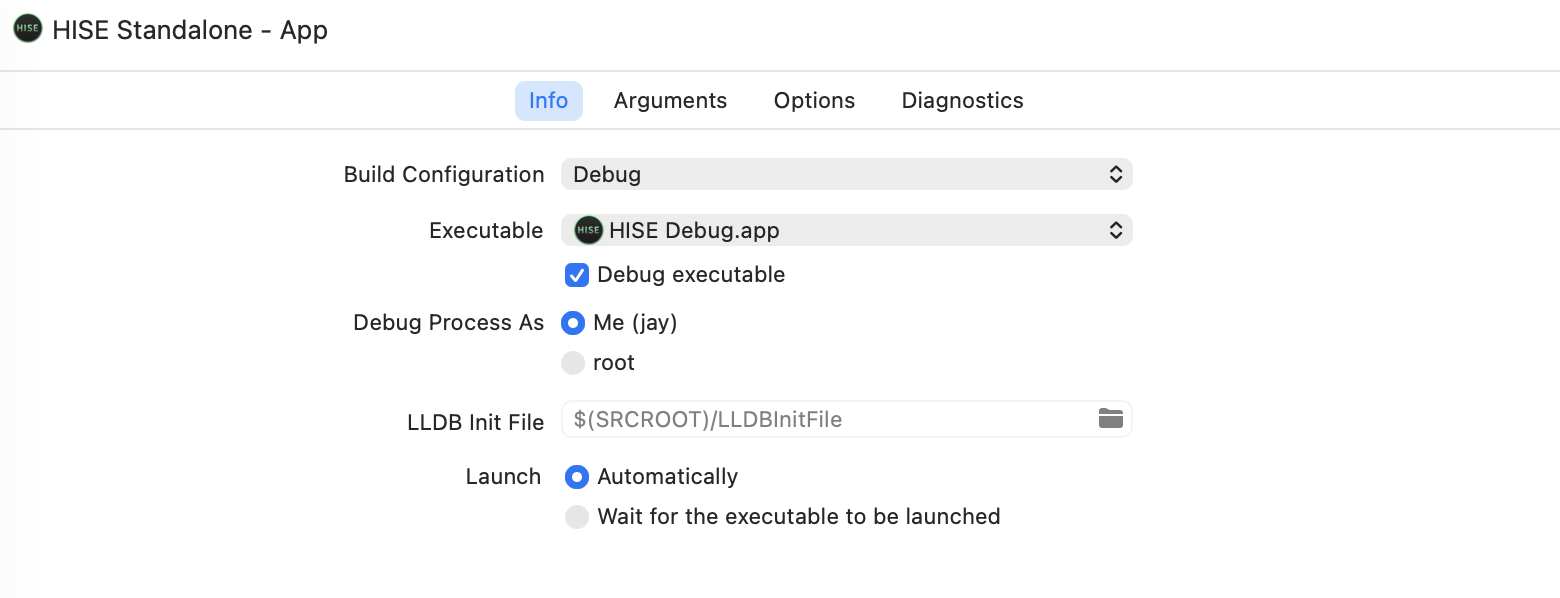
There shouldn't be any codesigning steps in the debug configuration. Are you sure you're building the debug and not the CI?
-
@David-Healey I think so, I took a screenshot.
-
@Jimi_Jay It looks correct to me. Did you download the HISE source code through git?
-
@David-Healey Yeah I used your command :
cd ~/Documents/
git clone --branch develop --recurse-submodules https://github.com/christophhart/HISE.git
cd HISE
git pull -
@Jimi_Jay It looks like you've done everything correctly. It's possible there is a bug in a recent commit of HISE.
You could try an earlier commit of HISE to see if it works. Run these two commands in the terminal after cding into the HISE directory
git reset --hardgit checkout 3957028845b3da93620aa781857dcbf8e9c294a5Then clean the build folder and try again.
-
@David-Healey It came up with an error :
HISE % git checkout 3957028845b3da93620aa781857dcbf8e9c294a5
error: The following untracked working tree files would be overwritten by checkout:
tools/api generator/ApiExtractor.exe
tools/api generator/BinaryBuilder.exe
tools/api generator/batchCreate.bat
tools/api generator/xml.doxyfile
Please move or remove them before you switch branches.
Aborting -
@Jimi_Jay Delete the files it mentioned. Then run the git checkout command again.
-
@David-Healey I think this means the command worked but I'll still send it here just in case :
HISE % git checkout 3957028845b3da93620aa781857dcbf8e9c294a5
warning: unable to rmdir 'tools/api generator': Directory not empty
warning: unable to rmdir 'tools/hise_lsp_server': Directory not empty
M JUCE
M tools/mcp_server
Note: switching to '3957028845b3da93620aa781857dcbf8e9c294a5'.You are in 'detached HEAD' state. You can look around, make experimental
changes and commit them, and you can discard any commits you make in this
state without impacting any branches by switching back to a branch.If you want to create a new branch to retain commits you create, you may
do so (now or later) by using -c with the switch command. Example:git switch -c
Or undo this operation with:
git switch -
Turn off this advice by setting config variable advice.detachedHead to false
HEAD is now at 395702884 Merge branch 'develop' of https://github.com/christophhart/HISE into develop
-
@David-Healey I cleaned the build folder on xcode and tried again and this time I got a different error :
Showing All Errors Only
Build target HISE Standalone - App of project HISE Standalone with configuration Debug
CompileC /Users/jay/Library/Developer/Xcode/DerivedData/HISE_Standalone-cnktsjmvoartasbasfwshrpxxybp/Build/Intermediates.noindex/HISE\ Standalone.build/Debug/HISE\ Standalone\ -\ App.build/Objects-normal/arm64/include_hi_backend_02.o /Users/jay/Documents/HISE/projects/standalone/JuceLibraryCode/include_hi_backend_02.cpp normal arm64 c++ com.apple.compilers.llvm.clang.1_0.compiler (in target 'HISE Standalone - App' from project 'HISE Standalone')
cd /Users/jay/Documents/HISE/projects/standalone/Builds/MacOSXUsing response file: /Users/jay/Library/Developer/Xcode/DerivedData/HISE_Standalone-cnktsjmvoartasbasfwshrpxxybp/Build/Intermediates.noindex/HISE Standalone.build/Debug/HISE Standalone - App.build/Objects-normal/arm64/82b82416624d2658e5098eb0a28c15c5-common-args.resp /Applications/Xcode.app/Contents/Developer/Toolchains/XcodeDefault.xctoolchain/usr/bin/clang -x c++ -ivfsstatcache /Users/jay/Library/Developer/Xcode/DerivedData/SDKStatCaches.noindex/macosx26.2-25C58-00fa09913b459cbbc988d1f6730289ae.sdkstatcache -fmessage-length\=0 -fdiagnostics-show-note-include-stack -fmacro-backtrace-limit\=0 -fno-color-diagnostics -Wno-trigraphs -Wno-missing-field-initializers -Wno-missing-prototypes -Wunreachable-code -Wnon-virtual-dtor -Wno-overloaded-virtual -Wno-exit-time-destructors -Wno-missing-braces -Wparentheses -Wswitch -Wunused-function -Wno-unused-label -Wno-unused-parameter -Wunused-variable -Wunused-value -Wempty-body -Wuninitialized -Wno-unknown-pragmas -Wno-shadow -Wno-four-char-constants -Wno-conversion -Wconstant-conversion -Wint-conversion -Wbool-conversion -Wenum-conversion -Wno-float-conversion -Wnon-literal-null-conversion -Wobjc-literal-conversion -Wshorten-64-to-32 -Wno-newline-eof -Wno-c++11-extensions -Wno-implicit-fallthrough -fstrict-aliasing -Wdeprecated-declarations -Winvalid-offsetof -Wno-sign-conversion -Winfinite-recursion -Wmove -Wcomma -Wblock-capture-autoreleasing -Wstrict-prototypes -Wrange-loop-analysis -Wno-semicolon-before-method-body -index-store-path /Users/jay/Library/Developer/Xcode/DerivedData/HISE_Standalone-cnktsjmvoartasbasfwshrpxxybp/Index.noindex/DataStore -Wreorder -Wno-reorder -Wno-inconsistent-missing-override -Wno-switch @/Users/jay/Library/Developer/Xcode/DerivedData/HISE_Standalone-cnktsjmvoartasbasfwshrpxxybp/Build/Intermediates.noindex/HISE\ Standalone.build/Debug/HISE\ Standalone\ -\ App.build/Objects-normal/arm64/82b82416624d2658e5098eb0a28c15c5-common-args.resp -MMD -MT dependencies -MF /Users/jay/Library/Developer/Xcode/DerivedData/HISE_Standalone-cnktsjmvoartasbasfwshrpxxybp/Build/Intermediates.noindex/HISE\ Standalone.build/Debug/HISE\ Standalone\ -\ App.build/Objects-normal/arm64/include_hi_backend_02.d --serialize-diagnostics /Users/jay/Library/Developer/Xcode/DerivedData/HISE_Standalone-cnktsjmvoartasbasfwshrpxxybp/Build/Intermediates.noindex/HISE\ Standalone.build/Debug/HISE\ Standalone\ -\ App.build/Objects-normal/arm64/include_hi_backend_02.dia -c /Users/jay/Documents/HISE/projects/standalone/JuceLibraryCode/include_hi_backend_02.cpp -o /Users/jay/Library/Developer/Xcode/DerivedData/HISE_Standalone-cnktsjmvoartasbasfwshrpxxybp/Build/Intermediates.noindex/HISE\ Standalone.build/Debug/HISE\ Standalone\ -\ App.build/Objects-normal/arm64/include_hi_backend_02.o -index-unit-output-path /HISE\ Standalone.build/Debug/HISE\ Standalone\ -\ App.build/Objects-normal/arm64/include_hi_backend_02.o/Users/jay/Documents/HISE/projects/standalone/JuceLibraryCode/include_hi_backend_02.cpp:9:10: fatal error: 'hi_backend/hi_backend_02.cpp' file not found
9 | #include <hi_backend/hi_backend_02.cpp>
| ^~~~~~~~~~~~~~~~~~~~~~~~~~~~~~
1 error generated./Users/jay/Documents/HISE/projects/standalone/JuceLibraryCode/include_hi_backend_02.cpp:9:10: 'hi_backend/hi_backend_02.cpp' file not found
Build failed 03/04/2026, 16:34 26.7 seconds
-
@Jimi_Jay Hmm at this stage I'd start trying different commits until I found one that builds. But that's not the easiest thing if you're not familiar working with git. It would be good if someone else chimed in with a working ARM macOS setup and could give some pointers.
You also might want to try the new setup tool: https://setup.hise.dev/
-
@David-Healey Does this setup tool work ? Because I already downloaded hise last year with a different macbook and not with git but it then wouldn't let me export the projects because it didn't find projucer even though I downloaded it to where they said it needed to be... I'll try anyway but yeah. It's weird that the versions of hise that are released on github don't work properly...
