Script FX living with Hardcoded counterpart
-
When developing, I keep both versions to be able to apply some changes in the network, compile, and reload the hardcoded FX.
Then I disable and add a suffix the the script FX one to prevent any conflict.
This solution is a bit cumbersome with many networks but it does do the job until final release where I can just get rid of the network modules.But here come the Extra Modulation Slots...
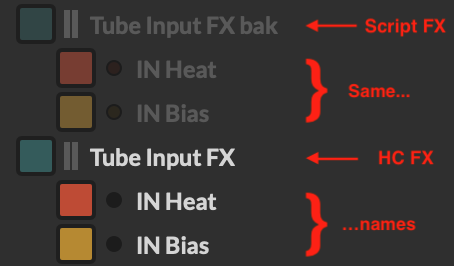
How can I live with them having the same name in the script FX module and in the Hardcoded module?Please don't tell I have to get rid of the script FX modules when compiling the networks (like with the "Replace script FX modules" tickbox, because if we want to make some changes we would then need to recreate them AND their inner Extra Modulation slots
the ideal thing would be to have them both script FX and hardcoded FX switchable, making them totally transparent to the project when compiling to prevent naming conflicts
Or am I just too far away from the ideal development process?
-
@ustk said in Script FX living with Hardcoded counterpart:
the ideal thing would be to have them both script FX and hardcoded FX switchable,
I think we had that in an older version with the "freeze" button, and I think it's a good idea. The current system is cumbersome. I keep a separate .hip with the uncompiled ones.
Free HISE Bootcamp Full Course for beginners.
YouTube Channel - HISE tutorials
My Patreon - More HISE tutorials -
@David-Healey said in Script FX living with Hardcoded counterpart:
I keep a separate .hip with the uncompiled ones.
Clever, I must try that... But it's a band aid, a proper solution should be implemented.
and if you change anything else in the project you get diff version that might be hard to deal with... -
It would be nice to have it in the right click drop down "Add processor before this module" as a "Swappable Hardcoded version of this module"
Then a kind of button aside the green "enable" button to actually swap them, or even a general menu command to "swap all swappable modules" at once
-
@David-Healey I almost have a solution...
Using an in-scrip preprocessor could allow to discriminate the modules and reference the modulators from either Script FX or Hardcoded modules dynamically.
So at the end of the project we can just ditch the scriptFX modules from the tree, the code behind being clean with that preprocessor.With this, we also need to attribute the
processorIdof any UI component that needs it programmaticallyI'll make some tests and report...
-
@David-Healey so I got it to work, allowing to swap ScriptFX and HardcodedFX at compile time using a preprocessor
// Use a preprocessor to allow swapping dynamically between Script FX and Hardcoded FX versions of the modules at compile time
#define USE_HARDCODED_MODULES 1

const var SUFFIXES = ["HCFX", "SCFX"];
const var HCFX = 0;
const var SCFX = 1;

reg suffix;

#if USE_HARDCODED_MODULES
suffix = HCFX;
#else
suffix = SCFX;
#endif

const var moduleBaseNames = ["Input Level ", "Tube Input ", "Noise "];

// Reference modules
const var InputLevelSCFX  = Synth.getEffect(moduleBaseNames[0] + SUFFIXES[suffix]);
const var TubeInputFX     = Synth.getEffect(moduleBaseNames[1] + SUFFIXES[suffix]);
const var NoiseFX         = Synth.getEffect(moduleBaseNames[2] + SUFFIXES[suffix]);


// Reference MM modules from parent module references instead of direct ID
const var INHeat = TubeInputFX.getModulatorChain(0).getModulatorChain(0);
const var INBias = TubeInputFX.getModulatorChain(1).getModulatorChain(0);


// Link UI component to processorId of the current modules
noiseListenBtn.set("processorId", moduleBaseNames[2] + SUFFIXES[suffix]);


// pre-populate the module list for later bypass (because we can't use Synth.getEffect after init)
const var hardcodedFxBypassList = [];
const var scriptFxBypassList = [];

populateBypassLists();
inline function populateBypassLists()
{
	for (name in moduleBaseNames)
	{
		hardcodedFxBypassList.push(Synth.getEffect(name + SUFFIXES[HCFX]));
		scriptFxBypassList   .push(Synth.getEffect(name + SUFFIXES[SCFX]));
	}
}


// Do the bypass after init
Content.callAfterDelay(100, bypassModules, "");
inline function bypassModules()
{
	for (i=0; i< hardcodedFxBypassList.length; i++)
	{
		hardcodedFxBypassList[i].setBypassed(suffix != HCFX);
		scriptFxBypassList[i]   .setBypassed(suffix != SCFX);
	}
}
The only (minor?) glitch I get is sliders currently modulating on the interface are not refreshing when using the second module (in my case the HCFX version)
That's probably because of a race condition in the MM naming that needs to be the same.This appart, the good news is that the modulators are linked internally, so they are still working no matter the swapping.
this shouldn't be an issue at all with other kind of sub-modules/modulators
-
@ustk Looking good!

