xcpretty Not Detected After Install on macOS Tahoe M1: Compiling Fails in HISE Export
-
@DJJD12345 Did you disable the checkbox? What are your individual module paths set to?
-
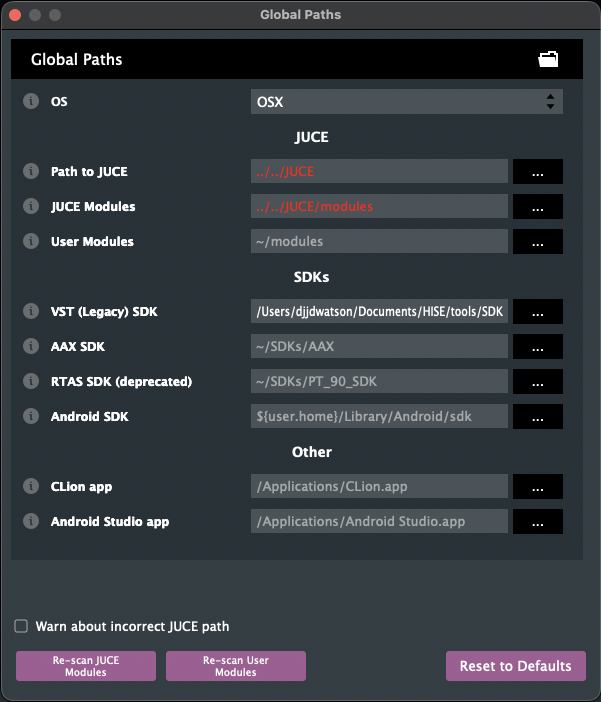
@David-Healey Path to juce /Documents/HISE/JUCE
And for modules /Documents/HISE/JUSE/modules -
@DJJD12345 Ok, set them as I showed you above.
../../etc. -
@David-Healey For the VST SDK path in global path for JUCE is /Documents/HISE/tools/SDK
and did what you said to put the global path as and modules path is red now, but juce path is not. But doing ../../JUCE for the path to juce makes the text red -
@DJJD12345 In the global paths dialog click the reset to defaults button.
@DJJD12345 said in xcpretty Not Detected After Install on macOS Tahoe M1: Compiling Fails in HISE Export:
and did what you said to put the global path as and modules path is red now, but juce path is not. But doing ../../JUCE for the path to juce makes the text red
Can you show me a screenshot?
-
-
@DJJD12345 Yeah click Reset to Defaults.
Show me what you've set for the individual modules.
-
@David-Healey Should I use the global path box checked for the modules
-
@DJJD12345 Copy what I posted in my images above, leave the global paths box unchecked.
-
@David-Healey why leave it unchecked
-
@DJJD12345 That's how Christoph set up the juicer project and it works. It might work with global paths, I don't know, if you want to try it you can, but I can't give you any support with it.
-
@David-Healey Reopening juce fixed that issue
-
@DJJD12345 The paths are correct now?
-
@David-Healey Its now saving the compiler file in juce
-
@DJJD12345 Excellent
-
@David-Healey, But now HISE Debug with Faust isn't opening it; it immediately closes.
-
@DJJD12345 It compiled successfully?
-
@David-Healey Yes, ran clean build folder and recompiling
-
@DJJD12345 Open it from a terminal or with xcode and see if it shows any error messages
-
@David-Healey How do I do that?