HISE 4.1: Obtaining Peak/RMS Values from Script to a Scripted UI Meter?
-
I'm building a stereo VU meter in HISE 4.1.
Current status:
Custom filmstrip needles working
NeedleL and NeedleR animate correctly using setValue()
MatrixPeakMeter works
AudioAnalyser works
Both successfully monitor a ScriptFX processor when ProcessorId = "Script FX2"What I'm trying to do now is obtain a real-time audio level value in script so I can drive the custom needles.
Things I've already tried:
Scriptnode core.peak
dynamics.envelope_follower
control.smoothed.parameter
Synth.getEffect("Script FX2")Results:
MatrixPeakMeter and AudioAnalyser clearly receive valid audio/meter data from Script FX2.
Synth.getEffect("Script FX2") returns a valid processor object.
getNumAttributes() returns 0.
I have not found a way to access the meter values from script.Question:
What is the recommended HISE 4.1 workflow for obtaining peak or RMS values from a ScriptFX processor and feeding them into a custom scripted UI meter?
-
@brucerothwell Why use script node for this? The built in peak meter floating tile already does what you want I think.
-
David --
Thanks for your reply.
I am new to HISE.
I already have assets created for building a VU meter plugin, and haven;' been able to figure out to feed system audio to the animated needle,
My assumption is that I need to use scripting.
I have, however, figure out how to use the MatrixPeakMeter, and see that responding to audio.
Additional observation:
In Scriptnode, the core.peak node offers "Add new external DisplayBuffer".
Creating buffers results in persistent entries (#1, #2, #3, etc.) that remain after saving the archive, closing HISE, and reopening the project.
Deleting the core.peak node does not remove these buffers.
Can external DisplayBuffers be accessed from scripting, or are they intended only for AudioAnalyser / visualization components?
-
@brucerothwell said in HISE 4.1: Obtaining Peak/RMS Values from Script to a Scripted UI Meter?:
Can external DisplayBuffers be accessed from scripting, or are they intended only for AudioAnalyser / visualization components?
I don't know, I haven't used them.
@brucerothwell said in HISE 4.1: Obtaining Peak/RMS Values from Script to a Scripted UI Meter?:
I have, however, figure out how to use the MatrixPeakMeter, and see that responding to audio.
The peak meter floating tile can be styled using custom look and feel to apply your filmstrips (search the forum, there are examples showing this).
-
@brucerothwell You need to feed a modulation signal into a global cable, and get your readouts from onInit side that you can use for scripting. There are a few good post on the forum about it if you do a quick search.
-
@brucerothwell If this is just peak metering, you can use
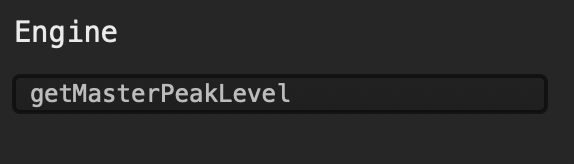
this api returns the peak level of your plugin master output.
-
@brucerothwell said in HISE 4.1: Obtaining Peak/RMS Values from Script to a Scripted UI Meter?:
DisplayBuffers be accessed from scripting
They can be but I dont think thats what you're looking for in this instance.
-
Thanks for the great responses on this so far!
I have one ting I need confirmation on:
Can MatrixPeakMeter be made to LOOK like my needle meter?
Is there a forum article, or other resource that can get me started, and even deep quickly, with LAF?
-
@brucerothwell Yes, first you need to learn how to use custom look and feel (laf). Then search the forum for peak meter laf, or vu meter laf.
Also there's a snippet here that shows how to do it without using filmstrips which is usually a better way to go if it fits your design: https://forum.hise.audio/topic/13154/knob-web-studio/66?_=1781298298486
-
@brucerothwell said in HISE 4.1: Obtaining Peak/RMS Values from Script to a Scripted UI Meter?:
MatrixPeakMeter be made to LOOK like my needle meter
I dont think you can change this component exactly like some other components like knobs and sliders. You can start with a base slider and LAF it like Dave suggested.
-
Speaking of which...
https://github.com/christophhart/HISE/pull/984
I can't believe the math were wrong the whole time
->upDecayTimewas inverted...


