Compiling HISE with Faust issue (Linux)
-
@David-Healey Hmm, I’m not sure where I’d find a suitable PPA that’s guaranteed to work on my system. A quick Google search didn’t turn up anything useful. What also confuses me a bit is the fact that this always worked with the Faust source builds in older HISE builds. If only I knew what the linker error message
cannot find -lfaustactually means.... -
@toxonic -lfaust is the faust library. You can use find to check where it is on your system
find /usr -name "libfaust*"Free HISE Bootcamp Full Course for beginners.
YouTube Channel - HISE tutorials
My Patreon - More HISE tutorials -
@David-Healey
Yes, I’ve already searched for libfaust and libfaust.so and found several matches (see below). By the way, the master branch of HISE - back when there was no dedicatedReleaseWithFaustbuild configuration yet - can be compiled with Faust without any issues.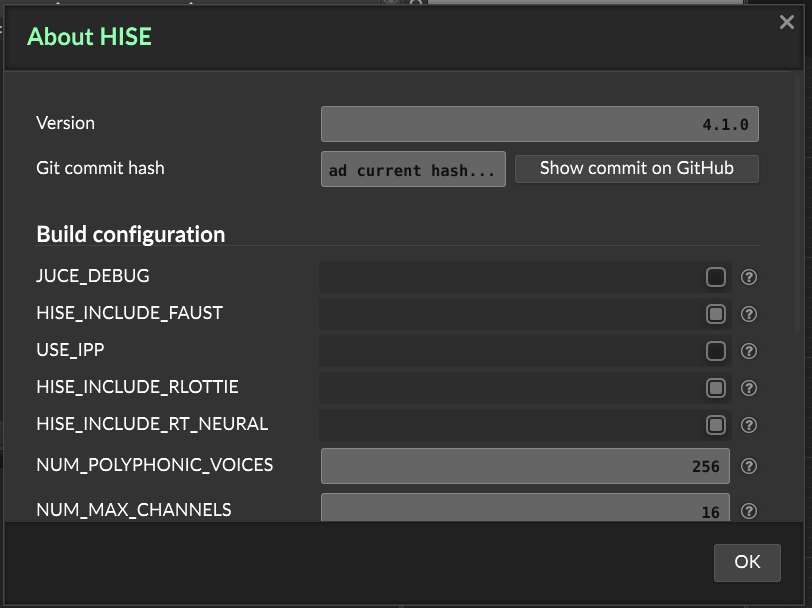
/usr/local/lib/libfaustmachine.so /usr/local/lib/libfaust.so.2 /usr/local/lib/libfaustmachine.so.1.0.0 /usr/local/lib/libfaust.so /usr/local/lib/libfaust.a /usr/local/lib/libfaustmachine.so.0 /usr/local/lib/libfaust.so.2.83.5 /usr/local/lib/libfaustmachine.a /usr/local/lib/libfaustwithllvm.a /usr/local/lib/libfaust.so.2.50.6 /usr/local/lib/libfaust.so.2.54.9 /usr/local/share/faust/webaudio/libfaust-glue.js /usr/local/share/faust/webaudio/libfaust-worklet-glue.js /usr/local/share/faust/webaudio/libfaust-wasm.js /usr/local/share/faust/webaudio/libfaust-glue.wasm /usr/local/share/faust/webaudio/libfaust-wasm.data /usr/local/share/faust/webaudio/libfaust-wasm.wasm /usr/local/include/faust/dsp/libfaust-box-c.h /usr/local/include/faust/dsp/libfaust.h /usr/local/include/faust/dsp/libfaust-c.h /usr/local/include/faust/dsp/libfaust-box.h /usr/local/include/faust/dsp/libfaust-signal-c.h /usr/local/include/faust/dsp/libfaust-signal.h -
@toxonic said in Compiling HISE with Faust issue (Linux):
By the way, the master branch of HISE - back when there was no dedicated ReleaseWithFaust build configuration yet
What do you have to do in Projucer to do that?
Free HISE Bootcamp Full Course for beginners.
YouTube Channel - HISE tutorials
My Patreon - More HISE tutorials -
@David-Healey
If I remember correctly, I just enabled the three Faust specific configuratons in the modules section (something about Faust, Faust_JIT and Faust_LLVM_JIT) and added 'faust' to the Linker libraries. -
@toxonic Hmm I'm not sure what's going on there. Do you get any output from this command?
cc -fuse-ld=mold -Wl,--trace -lfaust -x c /dev/null 2>&1 | grep libfaust(replace mold with gold if you're using gold).Free HISE Bootcamp Full Course for beginners.
YouTube Channel - HISE tutorials
My Patreon - More HISE tutorials -
@David-Healey Nope, no output. Sorry for my ignorance, what does this command do?
PS: I thought, maybe I would have to enable the Faust modules in the most recent HISE develop branch too, although it seems that they are already enabled in the ReleaseWithFaust configuration via the preprocessor definitions. But it didn't work, i get the same output:
Linking HISE Standalone - App mold: library not found: faust collect2: error: ld returned 1 exit status make: *** [Makefile:257: build/HISE Standalone] Error 1 -
@toxonic That command asks the linker if it can find faust, since you got no output that explains the issue. Why it works with the master branch is probably because that branch isn't using gold/mold but is using ld or something - just guessing.
This is the output I see
dave@debian:~$ cc -fuse-ld=mold -Wl,--trace -lfaust -x c /dev/null 2>&1 | grep libfaust
trace: /usr/lib/x86_64-linux-gnu/libfaust.so
It probably means the location for libfaust on your system is not in the system path. You could try adding it to the path in .bashrc and then sourcing .bashrc.
Free HISE Bootcamp Full Course for beginners.
YouTube Channel - HISE tutorials
My Patreon - More HISE tutorials -
@David-Healey
Oh wow, I guess, I will need help there. How do I do that? and I have 2 .bashrc on my system, one in my home folder and one in /etc/skel.
Which one should I use for that? -
@toxonic The one in your home folder
To add something to the path add it at the bottom of the file. Here I'm adding the path to ccache/bin, just replace that with the path to the folder where you have libfaust
export PATH="/usr/lib/ccache/bin/:$PATH"Then in a terminal run
source ~/.bashrc -
When replacing modl with gold or ld, I get no output as well...
-
@toxonic After adding the path run the command again to see if it the linker can find it.
Free HISE Bootcamp Full Course for beginners.
YouTube Channel - HISE tutorials
My Patreon - More HISE tutorials -
@David-Healey
Okay, I now see that there is obviously a problem on my system. Apart from thelibfaust.sofiles that are in the/tools/faust/fakelib_linuxfolder in the HISE repository, there is nolibfaust.sofile on my system at all. In/usr/local/libthere is only a dead symlink tolibfaust.so… which seems kind of weird to me. -
@toxonic Weird, I wonder why it worked with the master branch then... did you test it in HISE after compiling the master?
Free HISE Bootcamp Full Course for beginners.
YouTube Channel - HISE tutorials
My Patreon - More HISE tutorials -
@David-Healey Nope, not yet... let me check it out
-
@David-Healey
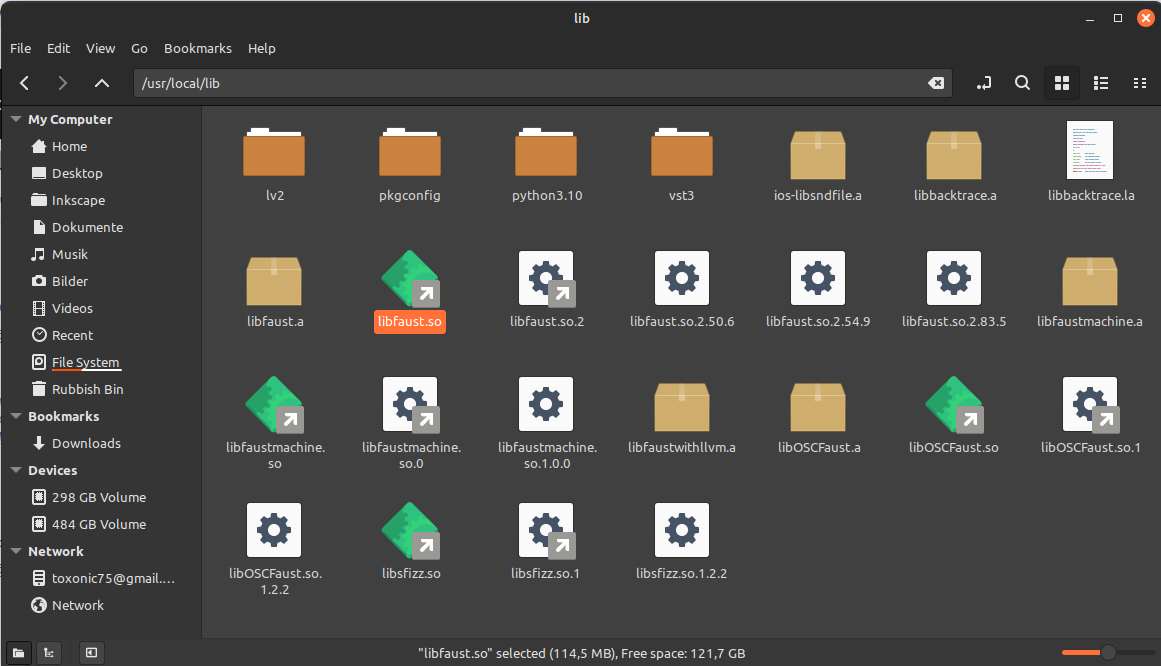
So, the master branch of HISE works with Faust. I opened an existing project and added a ScriptFX, and the Faust scripts work there. I can’t tell you why the master branch was able to compile — it’s a mystery to me.What also confuses me is the fact that there apparently is no libfaust.so on my system. The symlink to the shared library libfaust.so in /usr/local/lib is, by the way, 114 MB in size… how can that be? The file cannot be traced back to an original file.
-
@toxonic Hmm does the master branch include its own copy of faust?
Free HISE Bootcamp Full Course for beginners.
YouTube Channel - HISE tutorials
My Patreon - More HISE tutorials -
@David-Healey
How can I find that out? It doesn’t seem to be the case — at least no libfaust.so is included.
This is, what I get, when checking libfile.so if it's a file, and what it's linking againsttoxonic@toxonic-Vector-GP66-12UGS:~$ file /usr/local/lib/libfaust.so /usr/local/lib/libfaust.so: symbolic link to libfaust.so.2 toxonic@toxonic-Vector-GP66-12UGS:~$ ldd /usr/local/lib/libfaust.so linux-vdso.so.1 (0x00007ffc2f5d3000) libz.so.1 => /lib/x86_64-linux-gnu/libz.so.1 (0x00007f1b0350e000) libtinfo.so.6 => /lib/x86_64-linux-gnu/libtinfo.so.6 (0x00007f1b034dc000) libstdc++.so.6 => /lib/x86_64-linux-gnu/libstdc++.so.6 (0x00007f1b032b0000) libm.so.6 => /lib/x86_64-linux-gnu/libm.so.6 (0x00007f1b031c9000) libgcc_s.so.1 => /lib/x86_64-linux-gnu/libgcc_s.so.1 (0x00007f1b031a9000) libc.so.6 => /lib/x86_64-linux-gnu/libc.so.6 (0x00007f1b02f80000) /lib64/ld-linux-x86-64.so.2 (0x00007f1b09bda000) -
@David-Healey This is the
lddoutput for the HISE master branch binary. It seems to link against/usr/local/lib/libfaust.so.2toxonic@toxonic-Vector-GP66-12UGS:~$ ldd '/home/toxonic/Repos/HISE/projects/standalone/Builds/LinuxMakefile/build/HISE Standalone.faust' linux-vdso.so.1 (0x00007ffd3b922000) libasound.so.2 => /lib/x86_64-linux-gnu/libasound.so.2 (0x00007f6c490d5000) libfreetype.so.6 => /lib/x86_64-linux-gnu/libfreetype.so.6 (0x00007f6c4900d000) libGL.so.1 => /lib/x86_64-linux-gnu/libGL.so.1 (0x00007f6c48f86000) libfaust.so.2 => /usr/local/lib/libfaust.so.2 (0x00007f6c428fe000) libstdc++.so.6 => /lib/x86_64-linux-gnu/libstdc++.so.6 (0x00007f6c426d2000) libm.so.6 => /lib/x86_64-linux-gnu/libm.so.6 (0x00007f6c425e9000) libgcc_s.so.1 => /lib/x86_64-linux-gnu/libgcc_s.so.1 (0x00007f6c425c9000) libc.so.6 => /lib/x86_64-linux-gnu/libc.so.6 (0x00007f6c423a0000) /lib64/ld-linux-x86-64.so.2 (0x00007f6c49200000) libpng16.so.16 => /lib/x86_64-linux-gnu/libpng16.so.16 (0x00007f6c42365000) libz.so.1 => /lib/x86_64-linux-gnu/libz.so.1 (0x00007f6c42349000) libbrotlidec.so.1 => /lib/x86_64-linux-gnu/libbrotlidec.so.1 (0x00007f6c4233b000) libGLdispatch.so.0 => /lib/x86_64-linux-gnu/libGLdispatch.so.0 (0x00007f6c42281000) libGLX.so.0 => /lib/x86_64-linux-gnu/libGLX.so.0 (0x00007f6c4224d000) libtinfo.so.6 => /lib/x86_64-linux-gnu/libtinfo.so.6 (0x00007f6c4221b000) libbrotlicommon.so.1 => /lib/x86_64-linux-gnu/libbrotlicommon.so.1 (0x00007f6c421f8000) libX11.so.6 => /lib/x86_64-linux-gnu/libX11.so.6 (0x00007f6c420b8000) libxcb.so.1 => /lib/x86_64-linux-gnu/libxcb.so.1 (0x00007f6c4208c000) libXau.so.6 => /lib/x86_64-linux-gnu/libXau.so.6 (0x00007f6c42086000) libXdmcp.so.6 => /lib/x86_64-linux-gnu/libXdmcp.so.6 (0x00007f6c4207e000) libbsd.so.0 => /lib/x86_64-linux-gnu/libbsd.so.0 (0x00007f6c42066000) libmd.so.0 => /lib/x86_64-linux-gnu/libmd.so.0 (0x00007f6c42059000) -
@toxonic said in Compiling HISE with Faust issue (Linux):
It seems to link against /usr/local/lib/libfaust.so.2
And that file exists on your system?
Free HISE Bootcamp Full Course for beginners.
YouTube Channel - HISE tutorials
My Patreon - More HISE tutorials