Forum
    • Categories
    • Register
    • Login

    xcpretty Not Detected After Install on macOS Tahoe M1: Compiling Fails in HISE Export

    Scheduled Pinned Locked Moved Bug Reports
    80 Posts 3 Posters 772 Views
    Loading More Posts
    • Oldest to Newest
    • Newest to Oldest
    • Most Votes
    Reply
    • Reply as topic
    Log in to reply
    This topic has been deleted. Only users with topic management privileges can see it.
    • David HealeyD
      David Healey @DJJD12345
      last edited by

      @DJJD12345 I'm guessing it's reading configuration files from a previous time when you ran Projucer. Is that Projucer v6.1.3?

      Free HISE Bootcamp Full Course for beginners.
      YouTube Channel - Public HISE tutorials
      My Patreon - HISE tutorials

      D 2 Replies Last reply Reply Quote 0
      • D
        DJJD12345 @David Healey
        last edited by

        @David-Healey yes, should I use juce module folder in Hise source foler or the one that can with the latest version of juce

        1 Reply Last reply Reply Quote 0
        • D
          DJJD12345 @David Healey
          last edited by

          @David-Healey It's Juce 6.1.4 that Hise uses, not 6.1.3

          David HealeyD 1 Reply Last reply Reply Quote 0
          • David HealeyD
            David Healey @DJJD12345
            last edited by

            @DJJD12345 Ah yes I think on Mac it is 6.1.4.

            @DJJD12345 said in xcpretty Not Detected After Install on macOS Tahoe M1: Compiling Fails in HISE Export:

            @David-Healey yes, should I use juce module folder in Hise source foler or the one that can with the latest version of juce

            Only use what's included with the HISE source code. If you have another version it's possible that its config files are interfering and that's why you are seeing missing path errors.

            Free HISE Bootcamp Full Course for beginners.
            YouTube Channel - Public HISE tutorials
            My Patreon - HISE tutorials

            D 1 Reply Last reply Reply Quote 1
            • D
              DJJD12345 @David Healey
              last edited by

              @David-Healey Did that and said modules couldn't be found when the projucer path is set to the one in Hise source code, as well as the path to the JUCE modules

              David HealeyD 1 Reply Last reply Reply Quote 0
              • David HealeyD
                David Healey @DJJD12345
                last edited by David Healey

                @DJJD12345 said in xcpretty Not Detected After Install on macOS Tahoe M1: Compiling Fails in HISE Export:

                Did that and said modules couldn't be found when the projucer path is set to the one in Hise source code, as well as the path to the JUCE modules

                For the HISE modules the paths should be set to ../../

                36b73a3f-eb8e-472f-b10a-6bb53a8fc0e8-image.png

                For the JUCE modules the should be ../../JUCE/modules

                4773c649-f1f2-4175-bc45-a2ed91f77942-image.png

                Free HISE Bootcamp Full Course for beginners.
                YouTube Channel - Public HISE tutorials
                My Patreon - HISE tutorials

                D 1 Reply Last reply Reply Quote 1
                • D
                  DJJD12345 @David Healey
                  last edited by

                  @David-Healey What do you mean by "../../"?

                  David HealeyD 1 Reply Last reply Reply Quote 0
                  • David HealeyD
                    David Healey @DJJD12345
                    last edited by David Healey

                    @DJJD12345 That's what you need to put in those boxes if it's not there already. ../ means one directory up from the current directory, ../../ means two directories up.

                    Free HISE Bootcamp Full Course for beginners.
                    YouTube Channel - Public HISE tutorials
                    My Patreon - HISE tutorials

                    D 1 Reply Last reply Reply Quote 0
                    • D
                      DJJD12345 @David Healey
                      last edited by

                      @David-Healey No, for the global path to Juce and the juice modules.

                      David HealeyD 1 Reply Last reply Reply Quote 0
                      • David HealeyD
                        David Healey @DJJD12345
                        last edited by

                        @DJJD12345 Don't use the global paths.

                        This is what my global paths window looks like
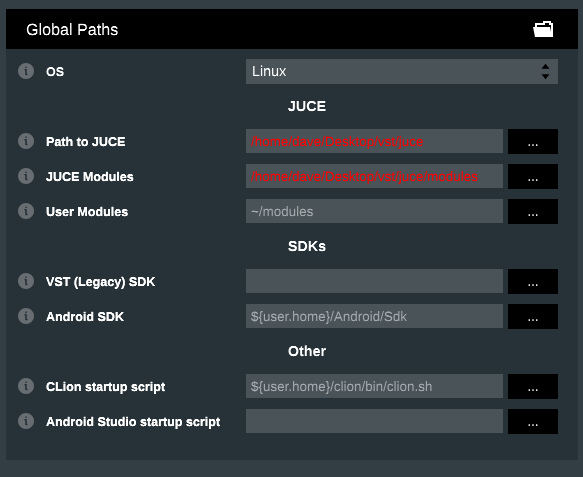
                        812fce2e-0593-471c-b4ae-497f24ecb1bc-image.png

                        But the checkbox is not enabled for the modules

                        85436ead-bf77-4d2c-91ec-b7b91480be8b-image.png

                        Free HISE Bootcamp Full Course for beginners.
                        YouTube Channel - Public HISE tutorials
                        My Patreon - HISE tutorials

                        D 3 Replies Last reply Reply Quote 0
                        • D
                          DJJD12345 @David Healey
                          last edited by

                          This post is deleted!
                          1 Reply Last reply Reply Quote 0
                          • D
                            DJJD12345 @David Healey
                            last edited by

                            @David-Healey You're on Linux; show me what the global paths look like on Mac

                            1 Reply Last reply Reply Quote 0
                            • D
                              DJJD12345 @David Healey
                              last edited by

                              @David-Healey, this is what my global path looks like for Juce. Screenshot 2025-12-02 at 17.19.07.png
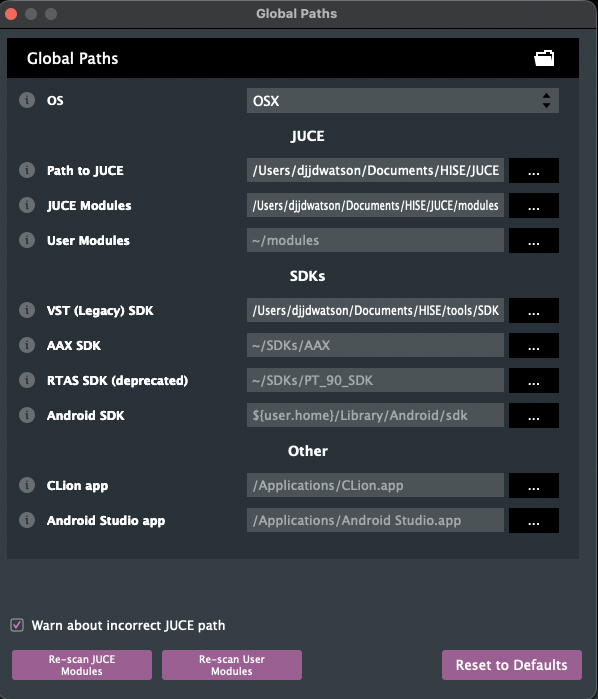
                              David HealeyD 1 Reply Last reply Reply Quote 0
                              • David HealeyD
                                David Healey @DJJD12345
                                last edited by

                                @DJJD12345

                                This is what I have on Mac but the global paths aren't used in the module settings. You can also disable the checkbox "Warn about incorrect JUCE path"
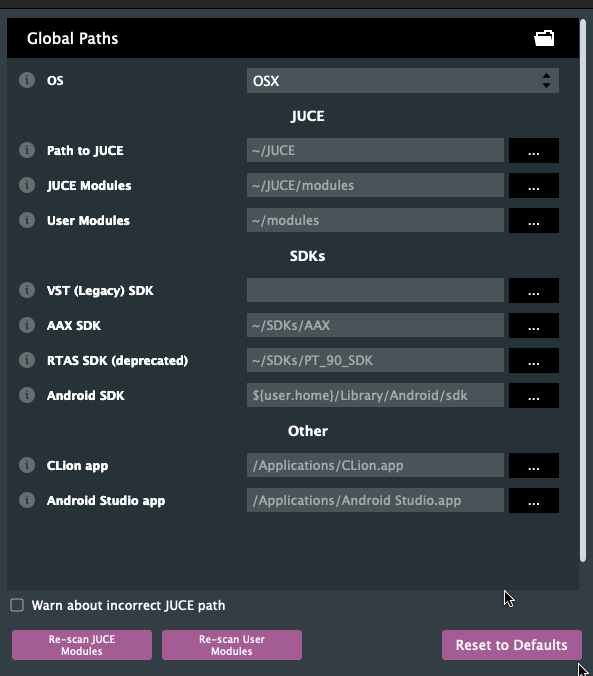
                                46e2881b-2589-49f5-a0f5-88723016d77e-image.png

                                Free HISE Bootcamp Full Course for beginners.
                                YouTube Channel - Public HISE tutorials
                                My Patreon - HISE tutorials

                                D 1 Reply Last reply Reply Quote 0
                                • D
                                  DJJD12345 @David Healey
                                  last edited by DJJD12345

                                  @David-Healey Still get error message of incorrect path for juce for global path when I try to save and open with IDE

                                  David HealeyD 1 Reply Last reply Reply Quote 0
                                  • David HealeyD
                                    David Healey @DJJD12345
                                    last edited by

                                    @DJJD12345 Did you disable the checkbox? What are your individual module paths set to?

                                    Free HISE Bootcamp Full Course for beginners.
                                    YouTube Channel - Public HISE tutorials
                                    My Patreon - HISE tutorials

                                    D 1 Reply Last reply Reply Quote 0
                                    • D
                                      DJJD12345 @David Healey
                                      last edited by

                                      @David-Healey Path to juce /Documents/HISE/JUCE
                                      And for modules /Documents/HISE/JUSE/modules

                                      David HealeyD 1 Reply Last reply Reply Quote 0
                                      • David HealeyD
                                        David Healey @DJJD12345
                                        last edited by

                                        @DJJD12345 Ok, set them as I showed you above. ../../ etc.

                                        Free HISE Bootcamp Full Course for beginners.
                                        YouTube Channel - Public HISE tutorials
                                        My Patreon - HISE tutorials

                                        D 1 Reply Last reply Reply Quote 0
                                        • D
                                          DJJD12345 @David Healey
                                          last edited by DJJD12345

                                          @David-Healey For the VST SDK path in global path for JUCE is /Documents/HISE/tools/SDK
                                          and did what you said to put the global path as and modules path is red now, but juce path is not. But doing ../../JUCE for the path to juce makes the text red

                                          David HealeyD 1 Reply Last reply Reply Quote 0
                                          • David HealeyD
                                            David Healey @DJJD12345
                                            last edited by

                                            @DJJD12345 In the global paths dialog click the reset to defaults button.

                                            @DJJD12345 said in xcpretty Not Detected After Install on macOS Tahoe M1: Compiling Fails in HISE Export:

                                            and did what you said to put the global path as and modules path is red now, but juce path is not. But doing ../../JUCE for the path to juce makes the text red

                                            Can you show me a screenshot?

                                            Free HISE Bootcamp Full Course for beginners.
                                            YouTube Channel - Public HISE tutorials
                                            My Patreon - HISE tutorials

                                            D 1 Reply Last reply Reply Quote 0
                                            • First post
                                              Last post

                                            27

                                            Online

                                            2.1k

                                            Users

                                            13.0k

                                            Topics

                                            112.4k

                                            Posts