Forum
    • Categories
    • Register
    • Login

    Windows 11: Error building standalone app

    Scheduled Pinned Locked Moved Newbie League
    2 Posts 1 Posters 23 Views
    Loading More Posts
    • Oldest to Newest
    • Newest to Oldest
    • Most Votes
    Reply
    • Reply as topic
    Log in to reply
    This topic has been deleted. Only users with topic management privileges can see it.
    • M
      millertone
      last edited by

      Hi Folks, first attempts creating the app - w/ Faust and IPP - and I'm getting the following error.

      The build tools for v145 (Platform Toolset = 'v145') cannot be found. To build using the v145 build tools, please install v145 build tools.  Alternatively, you may upgrade to the current Visual Studio tools by selecting the Project menu or right-click the solution, and then selecting "Retarget solution".
      

      Things are a bit complicated because I'm using VS2022 for game development and there are specific C++ dependencies for Unreal Engine. I've tried to modify VS but I don't even see an option for v145 Build Tools.

      Thanks for having a look.

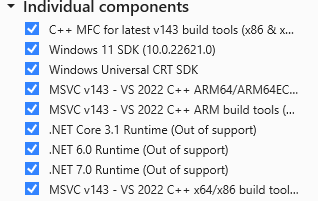
      Here's what my VS looks like:
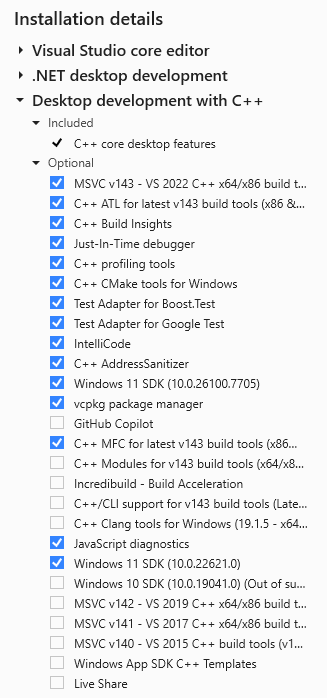
      c2f32eb3-0505-4e95-8562-b8b5cb1481a0-image.png

      fe099a63-ce5b-4d68-a1a0-d685fecb00e4-image.png

      1 Reply Last reply Reply Quote 0
      • M
        millertone
        last edited by

        Fixed thanks to Google AI Mode which told me how to switch to the v143 toolset.

        1 Reply Last reply Reply Quote 0
        • First post
          Last post

        19

        Online

        2.5k

        Users

        13.9k

        Topics

        120.9k

        Posts