Forum
    • Categories
    • Register
    • Login

    Different VU/peak meters for different samplers

    Scheduled Pinned Locked Moved Solved General Questions
    6 Posts 2 Posters 1.1k Views
    Loading More Posts
    • Oldest to Newest
    • Newest to Oldest
    • Most Votes
    Reply
    • Reply as topic
    Log in to reply
    This topic has been deleted. Only users with topic management privileges can see it.
    • J
      johnmike
      last edited by

      Question of The moment…so I know how to create a peak/vu meter for your master volume of everything…but I’ve got a project with 8 different samplers in it and I’ve been trying to work out how to create a meter for each sampler(I’m building out a mixer)…not to where I can post a snippet yet…but just curious if anyone has done anything like that in their project?

      orangeO 1 Reply Last reply Reply Quote 0
      • orangeO
        orange @johnmike
        last edited by

        @johnmike
        Yes, this is of course possible. You can add a SimpleGain module to the fx section of each sampler and open MatrixPeakMeter Floating Tile separately from each SimpleGain module.

        https://github.com/beyhanklc/Curated-Signals

        develop Branch / XCode 13.1
        macOS Monterey / M1 Max

        1 Reply Last reply Reply Quote 0
        • J
          johnmike
          last edited by johnmike

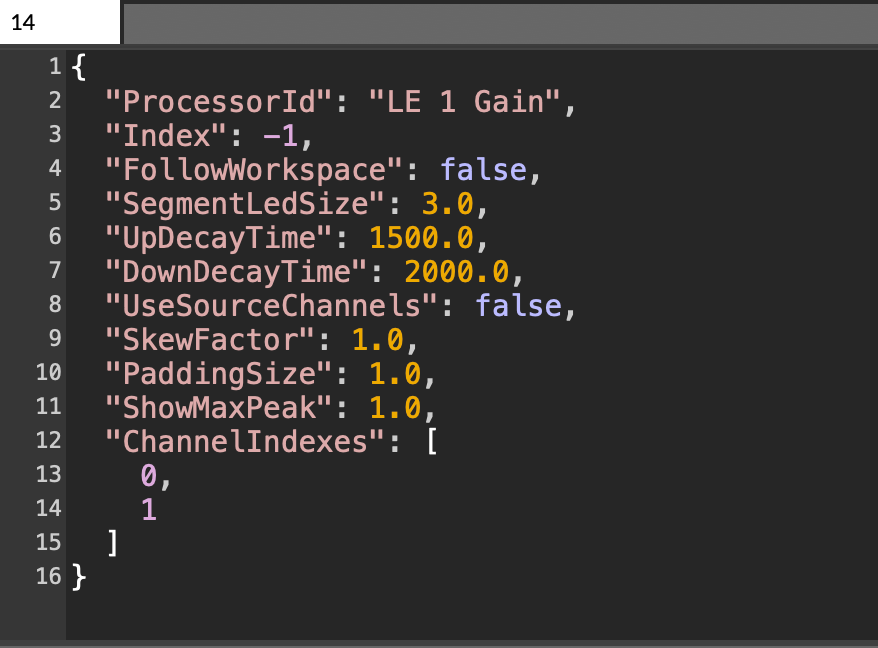
          @orange man didn't think it was THAT simple...was expecting a whole lot more coding and such lol...but other thing is It's not as accurate as my main meter...not even accurate to the meter on the gain module...maybe something I got in my settings?
          Screenshot 2024-10-05 at 4.55.23 PM.png

          orangeO 1 Reply Last reply Reply Quote 0
          • orangeO
            orange @johnmike
            last edited by

            @johnmike Yes it is simple. BTW, this is not VU meter, this is peak meter. But you can adjust the decay time and other parameters according to your taste.

            https://github.com/beyhanklc/Curated-Signals

            develop Branch / XCode 13.1
            macOS Monterey / M1 Max

            1 Reply Last reply Reply Quote 0
            • orangeO
              orange
              last edited by orange

              Also as an alternative, there is another method with using knobs & laf.

              See “Knob peak meter”

              https://forum.hise.audio/topic/6615/laf-collection-for-everyone?_=1728161844509

              https://github.com/beyhanklc/Curated-Signals

              develop Branch / XCode 13.1
              macOS Monterey / M1 Max

              J 1 Reply Last reply Reply Quote 0
              • J
                johnmike @orange
                last edited by

                @orange dope! yup I was able to restructure my gain and its working the way I need for it to now...this is good! gonna def check out the other thread...thanks!

                1 Reply Last reply Reply Quote 0
                • J johnmike marked this topic as a question on
                • J johnmike has marked this topic as solved on

                • First post
                  Last post

                7

                Online

                3.1k

                Users

                14.0k

                Topics

                121.9k

                Posts